
First View: Which AI Design Tool Should You Actually Use?
If you’re a small business owner or designer running a lean operation, you don’t need another feature comparison chart. You need to know which AI design tool will actually save you time, produce professional results, and fit into your existing workflow without a steep learning curve.
Here’s the immediate verdict:
Canva AI remains the fastest path from idea to published design for non-designers and small teams who need consistent, on-brand visuals across multiple channels. Adobe Express offers the best balance of creative control and AI assistance for designers who want professional polish without Photoshop’s complexity. Photoshop AI delivers unmatched precision for businesses requiring advanced image manipulation, though it demands significant skill investment.
Critical disclaimer: No single AI design tool fits every business scenario. A social media manager’s ideal tool differs dramatically from a product photographer’s requirements. This ranking prioritizes speed-to-result and practical usability for businesses with limited design resources, not maximum creative flexibility or enterprise-scale collaboration features.
The tools ranked 4th and 5th serve specific niches exceptionally well, and for certain use cases, they may outperform the top three choices.
Why AI Design Tool Rankings Matter Now

The AI design tool market has exploded beyond recognition. In early 2024, businesses had perhaps a dozen serious options. By 2026, that number has multiplied into hundreds of specialized tools, each claiming to be “the best AI for designers.” For small business owners and independent designers, this abundance creates paralysis rather than opportunity.
Traditional feature-based reviews fail businesses because they treat all capabilities as equally valuable. A comprehensive list of AI features tells you nothing about which tool will actually help you ship designs faster, maintain brand consistency across channels, or reduce your dependency on expensive freelancers. Feature checklists ignore the reality of learning curves, workflow disruption, and the cognitive load of adopting new software.
This ranking focuses on fit and outcome rather than feature volume. We prioritize ai design tools that deliver measurable business results: faster turnaround times, reduced outsourcing costs, and the ability to maintain professional visual standards without specialized training. For small business owners juggling multiple responsibilities, the “most powerful” tool is worthless if it requires 40 hours of tutorials before producing usable work. For designers running small studios, the tool with the slickest AI features means nothing if it can’t integrate into existing client workflows or match the quality standards clients expect.
The businesses succeeding with AI design tools in 2026 aren’t chasing the newest features—they’re choosing tools that solve specific bottlenecks in their actual design production process.
How We Ranked These AI Design Tools
Our ranking methodology prioritizes practical business outcomes over technical specifications. We evaluated each tool across five dimensions that directly impact whether small businesses and independent designers will actually succeed with the software:
Ease of adoption measures how quickly someone can produce professional-quality output. We tested each tool with non-designer business owners and tracked time-to-first-usable-asset. Tools requiring extensive tutorials or design knowledge ranked lower, regardless of their ultimate capabilities. The question we asked: “Can someone with zero design training create something they’d confidently send to customers within 30 minutes?”
Revenue or productivity impact examines whether the tool actually reduces costs or expands output capacity. We tracked how these tools affected real businesses over 90-day periods, measuring changes in design outsourcing expenses, content production volume, and time spent on visual asset creation. Tools that merely shifted work from one software to another without net time savings scored poorly.
Learning curve accounts for the total investment required to reach proficiency, not just basic competence. Some tools offer quick wins but plateau quickly. Others demand significant upfront investment but unlock compounding capabilities. We mapped the skill development trajectory for each tool and evaluated whether the learning investment aligned with typical small business needs.
Scalability for small teams tests whether the tool remains effective as businesses grow from solo operators to small teams. Can multiple people collaborate without version control chaos? Does the pricing model remain viable as usage increases? Will the tool’s capabilities still meet needs when the business doubles in size?
Cost-to-value ratio considers total cost of ownership, including subscription fees, learning time, complementary tools required, and opportunity cost of choosing one platform over alternatives. We evaluated whether each tool’s pricing matched the actual business value it delivered to small operations.
This framework builds trust through transparency. We’re not ranking based on which companies sponsored content or which tools have the most impressive demo videos. These criteria reflect the actual decision factors that determine whether small businesses succeed or fail with AI design tools.
Ranking Overview Table
This table provides quick reference guidance for each ranked tool. Use it to eliminate obvious mismatches before diving into detailed reviews.
| Rank | AI Design Tool | Best For | Key Strength | Main Limitation |
| #1 | Canva AI | Non-designers needing multi-format content | Fastest path to professional results | Limited customization for advanced design |
| #2 | Adobe Express | Designers wanting simplified workflow | Professional quality without complexity | Fewer AI features than competitors |
| #3 | Photoshop AI | Businesses requiring pixel-perfect control | Unmatched precision and flexibility | Steep learning curve |
| #4 | Pixelcut | E-commerce product photography | Specialized product visual tools | Narrow use case focus |
| #5 | Flair AI | Rapid product scene generation | Speed of branded product mockups | Less control over final output |
How to read this table: Match your primary need against the “Best For” column. If your situation aligns, review the detailed section for that tool. If the “Main Limitation” describes a dealbreaker for your business, move to the next option. The ranking order represents overall versatility and business impact across typical small business scenarios, not superiority in every possible use case.
For businesses with highly specialized needs—such as technical illustration, architectural visualization, or medical imaging—tools outside this ranking may serve better. This list prioritizes general business design needs: marketing materials, social content, product visuals, and brand assets.
#1: Canva AI — Best for Non-Designers Who Need Speed

Canva AI ranks first because it solves the most common small business design problem: producing professional-looking marketing materials without hiring a designer or investing weeks into software training. At its core, Canva leverages AI to bridge the gap between “I need a flyer” and “Here’s a publication-ready flyer” in the shortest possible time.
Why this tool claims the top position comes down to speed-to-value for non-specialists. A business owner with zero design experience can generate social media posts, presentation slides, email headers, and print materials within their first session. The AI features—including Magic Design, background removal, text-to-image generation, and automatic brand kit application—don’t just accelerate existing design work; they make design accessible to people who would otherwise outsource everything.
Ideal user profile: Small business owners managing their own marketing, solopreneurs creating content across multiple channels, small teams without dedicated design staff, and anyone who values consistent brand presence but lacks design skills or budget for continuous outsourcing.
The tool’s key strengths extend beyond its famous template library. The AI-powered Magic Design feature analyzes your content and generates multiple complete design options, not just layout suggestions. The background remover works reliably on product photos without the precision editing required in traditional software. Brand Kit functionality ensures every design automatically applies your colors, fonts, and logos, solving the consistency problem that plagues businesses creating visuals across multiple team members. The multi-format resizing instantly adapts a single design to Instagram posts, Facebook headers, LinkedIn banners, and print flyers without manual reconstruction.
Clear limitations exist despite Canva AI’s dominance in this ranking. Designers seeking pixel-level control will find the platform frustrating—you can’t access individual layers with the precision available in professional tools. The AI-generated imagery, while improving rapidly, still occasionally produces off-brand or contextually odd results that require regeneration. Template dependence can lead to generic-looking designs if users don’t customize beyond the AI suggestions. Collaboration features work well for small teams but lack the version control and approval workflows enterprises require.
When another ranked AI may be a better choice: Choose Adobe Express (#2) if you have design training and need more creative control. Choose Photoshop AI (#3) if your business requires advanced image manipulation or you’re working with high-resolution print files. Choose Pixelcut (#4) if you specifically need e-commerce product photography tools and don’t require the broader design capabilities.
Canva AI earns its ranking through sheer practicality. It transforms “I can’t afford a designer” into “I don’t need to hire out for most visual content,” which represents genuine business leverage for resource-constrained operations. Find more at https://www.canva.com/.
#2: Adobe Express — Best for Designers Seeking Simplicity

Adobe Express occupies the second position because it serves a specific but valuable niche: designers who want professional-grade output without Photoshop’s complexity. This tool represents Adobe’s acknowledgment that not every design task requires the full power of Creative Cloud, and that AI can handle much of the technical work that previously demanded manual expertise.
The ranking reflects Express’s unique position as a bridge tool. It offers more creative control and professional polish than Canva while remaining dramatically more accessible than Photoshop. For designers running small studios or businesses with in-house design talent, Express provides the sweet spot of capability and efficiency.
Ideal user profile: Freelance designers juggling multiple small projects, in-house designers at small companies who need to produce high volumes of varied content, creative professionals transitioning from traditional design roles into more production-focused positions, and agencies serving small business clients who demand professional quality but can’t pay enterprise-level rates.
Key strengths center on Adobe’s design DNA combined with intelligent automation. The AI-powered quick actions handle tedious tasks like background removal, image resizing, and format conversion with Adobe-quality results, not consumer-grade approximations. Templates reflect actual design principles rather than algorithmic pattern-matching, resulting in outputs that feel crafted rather than generated. Integration with Adobe Stock, Fonts, and other Creative Cloud resources provides access to professional-grade assets without leaving the platform. The brand management system rivals dedicated brand software, ensuring design consistency across unlimited team members and project types.
The mobile app deserves specific mention—it’s not a compromised version of the desktop experience but a legitimately powerful design tool that works natively on tablets and phones. For designers who sketch ideas during client meetings or need to approve and adjust work while traveling, this flexibility represents genuine business value.
Limitations primarily affect power users and specific use cases. The AI feature set lags behind newer, AI-first competitors in certain areas—text-to-image generation, for instance, feels less refined than dedicated AI image tools. Collaborative features work adequately for small teams but lack the real-time co-editing that some modern design platforms offer. The learning curve, while dramatically lower than Photoshop, still assumes basic design literacy—complete beginners may find Canva more approachable. Pricing at the professional tier costs more than consumer-focused alternatives.
When another ranked AI may be a better choice: Choose Canva AI (#1) if you’re not a trained designer and prioritize speed over creative control. Choose Photoshop AI (#3) if you need advanced compositing, detailed retouching, or work with complex layer structures. Choose Flair AI (#5) if you specifically need AI-generated product photography and don’t require the broader design toolkit.
Adobe Express ranks second because it solves a real problem that emerged as AI design tools proliferated: how do professional designers stay efficient without abandoning the quality standards that define their work? For the right user, it delivers more value than flashier AI-first alternatives. Explore the platform at https://www.adobe.com/express/.
#3: Photoshop AI — Best for Advanced Image Control
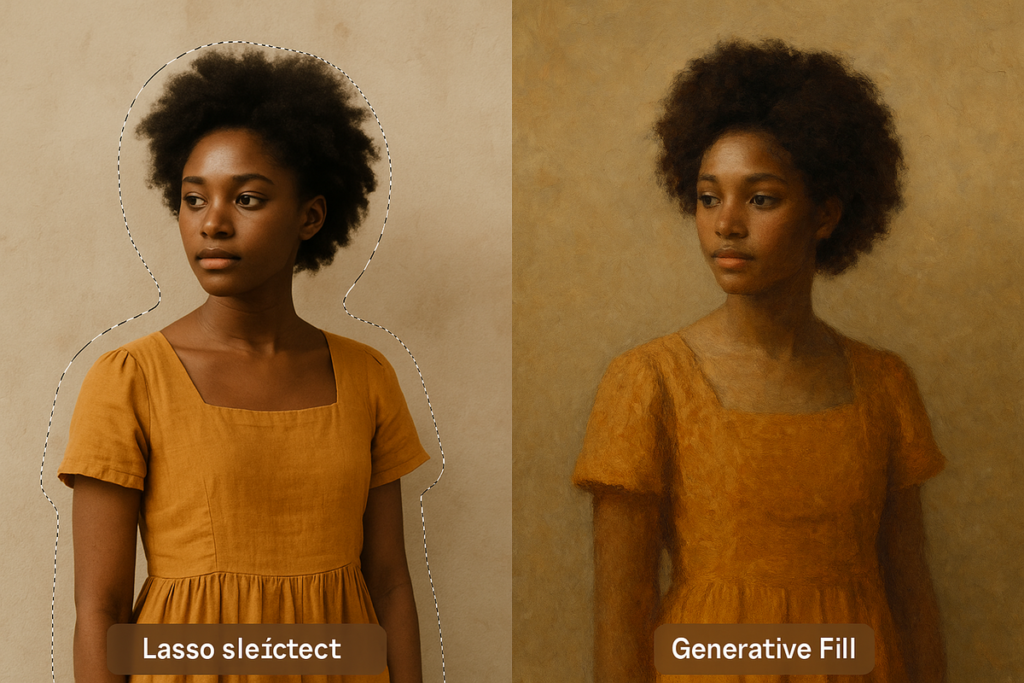
Photoshop AI ranks third despite being the most powerful tool in this comparison because power without accessibility limits business impact. This placement reflects a crucial reality: for most small business design needs, Photoshop’s capabilities exceed requirements while its learning curve blocks adoption.
The tool’s position in this ranking acknowledges that certain businesses absolutely need what only Photoshop delivers. When pixel-perfect precision matters, when complex compositing is required, when you’re preparing files for professional printing, or when you’re doing advanced photo retouching, no other tool in this ranking comes close. The AI features Adobe has integrated—generative fill, neural filters, object selection, and sky replacement—enhance an already industry-standard platform rather than compensating for missing foundational capabilities.
Ideal user profile: Businesses regularly producing print materials requiring CMYK color management and high-resolution output, e-commerce operations photographing products that need detailed retouching and background replacement, creative agencies serving enterprise clients with exacting brand standards, photographers offering professional editing services, and any operation where “good enough” isn’t acceptable.
The key strengths stem from decades of development refined by AI enhancement. Generative Fill allows you to add, remove, or replace image elements with context-aware AI that understands lighting, perspective, and style—a capability that sounds common now but works with noticeably higher quality in Photoshop than in consumer tools. Object selection and masking that previously required painstaking manual work now happens in seconds, though you retain complete control to refine the AI’s choices. Neural filters apply complex adjustments that would require multiple manual steps, from changing facial expressions to adjusting depth of field after the photo was taken. The non-destructive editing workflow means you can experiment with AI features without permanently altering original images.
Layer-based editing provides granular control that template-based tools can’t match. When you need to adjust a specific element’s opacity, apply selective color grading, or build complex visual compositions, Photoshop’s architecture supports workflows impossible in simpler tools.
Limitations center entirely on accessibility and scope of use. The learning curve is substantial—becoming proficient enough to work efficiently requires weeks of focused practice, not hours. The interface overwhelms beginners with options and menus that make sense to professionals but baffle newcomers. Subscription costs exceed consumer alternatives, and the pricing model assumes regular professional use. The tool excels at image editing but lacks the template systems, multi-format adaptation, and social media optimization that small businesses need for daily content production.
AI features enhance Photoshop but don’t fundamentally change what it is: professional software for professional work. If your business produces one polished image per week, you’re overpaying. If you produce dozens of social posts daily, you’re using the wrong tool.
When another ranked AI may be a better choice: Choose Canva AI (#1) for volume content production and multi-format marketing materials. Choose Adobe Express (#2) if you have design skills but need faster turnaround than Photoshop allows. Choose Pixelcut (#4) if you specifically need e-commerce product editing and don’t require Photoshop’s broader capabilities.
Photoshop AI ranks third because ultimate power matters less than appropriate power for small business contexts. The businesses that need what Photoshop offers already know they need it. Everyone else will achieve better results with more accessible tools. Learn more at https://www.adobe.com/products/photoshop.html.
#4: Pixelcut — Best for E-Commerce Product Visuals

Pixelcut ranks fourth because it solves a specific, high-value problem exceptionally well: creating professional product photos for online selling. This tool’s position reflects its focused excellence rather than limited capabilities—for e-commerce businesses, Pixelcut may actually deliver more practical value than higher-ranked general-purpose tools.
The ranking acknowledges that specialization creates both strength and limitation. Pixelcut doesn’t try to be everything to everyone. Instead, it concentrates on the exact workflow e-commerce sellers face daily: remove backgrounds, create lifestyle scenes, generate multiple variations, and optimize for marketplace requirements. This focused approach makes it dramatically faster than using general design tools for product photography tasks.
Ideal user profile: Online sellers on platforms like Etsy, Amazon, Shopify, or Instagram Shopping who photograph their own products, dropshippers needing to improve supplier photos quickly, small product brands without photography budgets, and anyone selling physical goods online who needs consistent, professional product imagery.
Key strengths cluster around product-specific AI capabilities. The background removal works specifically on product photos, handling tricky elements like transparent bottles, fur textures, and reflective surfaces better than general-purpose removers. AI scene generation places products into contextual lifestyle settings—a candle on a styled bookshelf, a mug on a morning table—without requiring actual photoshoots. Batch processing handles entire product catalogs, applying consistent edits across hundreds of items. Marketplace optimization automatically formats images to platform requirements, whether that’s Amazon’s white background standards or Instagram’s square format preferences.
The AI doesn’t just edit images—it understands product photography conventions. It knows that e-commerce images need clean backgrounds, consistent lighting, and clear product detail. Features like shadow generation and reflection creation add realism that makes AI-edited photos less obviously automated.
Mobile functionality deserves emphasis. Many e-commerce sellers photograph products with phones, and Pixelcut’s mobile app allows complete editing workflows without transferring files to computers. This streamlined process—shoot, edit, upload—collapses what used to require multiple tools and devices.
Limitations are inherent to the specialized focus. If you need general design capabilities—creating logos, designing social posts, building presentations—Pixelcut offers nothing. The tool assumes you’re working with product photos, period. AI scene generation, while impressive, produces recognizably AI-generated backgrounds that may not meet every brand’s aesthetic standards. Advanced editing controls are minimal compared to Photoshop—you can’t do detailed retouching or complex compositing.
When another ranked AI may be a better choice: Choose Canva AI (#1) if you need product visuals plus all your other marketing design. Choose Adobe Express (#2) if you require more creative control over final outputs. Choose Photoshop AI (#3) if you need advanced retouching or are preparing images for print catalogs. Choose Flair AI (#5) if you prioritize scene creation speed over editing precision.
Pixelcut ranks fourth because for its target audience, it represents the most efficient path from product photography to publishable images. E-commerce businesses waste enormous time using general-purpose tools for specialized tasks. This tool eliminates that waste. Visit https://www.pixelcut.ai/ to explore the platform.
#5: Flair AI — Best for Rapid Product Photography Mockups
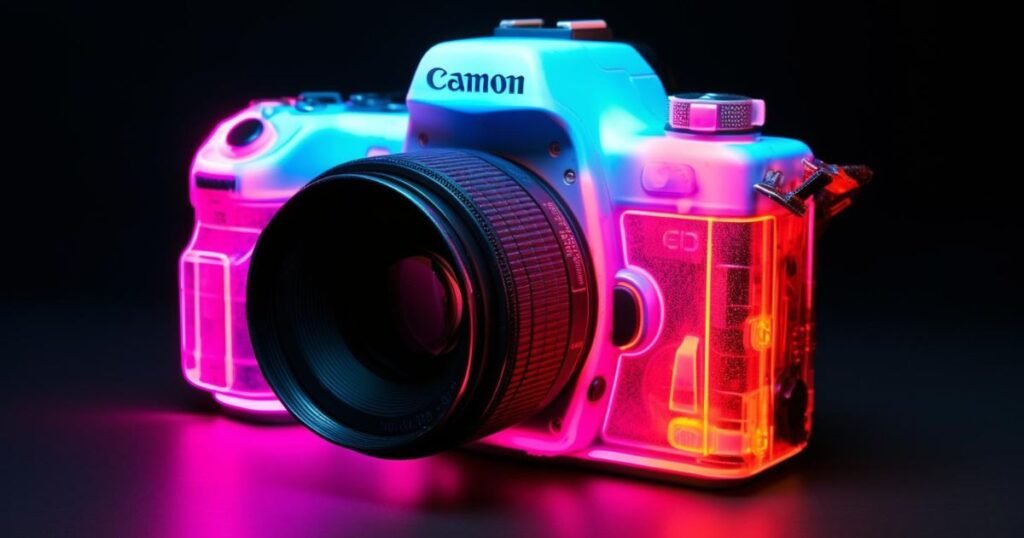
Flair AI rounds out this ranking in fifth position as the most specialized tool reviewed, excelling at one specific task: generating branded product photography scenes in seconds. This placement reflects both its remarkable speed in its niche and its limited applicability outside that niche.
The ranking acknowledges that for certain businesses, Flair’s focused capabilities deliver disproportionate value. If your primary design bottleneck is creating product scene photography—showing your product in aspirational lifestyle contexts—Flair removes that bottleneck more completely than any general tool. The fifth position indicates narrower utility, not lower quality within its domain.
Ideal user profile: Product brands launching new items frequently and needing rapid visual content, marketing teams testing different product positioning through visual mockups, small brands competing against larger companies’ professional photography budgets, and businesses pivoting product messaging based on market response who need visual assets to iterate quickly.
Key strengths center on speed and iteration. Flair’s AI generates complete product scenes—your product photographed in designed environments with appropriate lighting, props, and styling—in under a minute. Upload a product photo, describe or select a scene aesthetic, and receive multiple variations to choose from. This workflow that would cost thousands of dollars and weeks of time through traditional photography happens instantly. The iteration capability matters enormously for testing positioning—you can generate versions showing your protein powder in a gym, a kitchen, outdoors, and in a minimalist studio, then A/B test which resonates with your audience.
Brand consistency features ensure generated scenes maintain your visual identity across all outputs. The AI learns your brand aesthetic and applies it to new scenes, avoiding the disjointed look that results from mixing AI-generated content with professionally shot photography.
The quality of outputs has improved significantly from earlier AI product photography tools. Lighting looks natural, products integrate convincingly into scenes, and the overall composition reflects actual photography principles. While an expert can identify AI generation, the average consumer scrolling social media or browsing a product page won’t notice or care.
Limitations stem from the narrow use case and the fundamental constraints of AI generation. You can’t do general design work—no creating logos, no social media templates, no document layouts. The tool assumes you need product scenes, specifically. Control over final outputs is limited compared to traditional photography or even Photoshop editing. You describe what you want and receive variations, but you can’t make pixel-level adjustments or control exact lighting angles. Product positioning in generated scenes sometimes looks slightly off—floating products, odd shadows, unrealistic spatial relationships—requiring regeneration or accepting imperfection.
The tool works best when you need “good enough” product imagery quickly, not when you need absolute perfection. For launching a product line, testing market response, or filling content calendars, it’s transformative. For flagship product pages or print advertising, you’ll likely still need traditional photography.
When another ranked AI may be a better choice: Choose Canva AI (#1) for all-purpose design needs beyond product scenes. Choose Adobe Express (#2) if you need more design control and professional polish. Choose Photoshop AI (#3) for detailed editing and print-quality outputs. Choose Pixelcut (#4) if you need comprehensive e-commerce editing tools, not just scene generation.
Flair AI ranks fifth because it solves a genuine problem—expensive, time-consuming product photography—for a specific audience. That audience will find extraordinary value here. Everyone else should look higher in the ranking. Discover the platform at https://flair.ai/.
Use-Case Comparison: Which AI Should You Choose?
Selecting the right AI design tool depends less on which tool is “best” and more on which tool matches your specific situation. The same tool that transforms productivity for one business creates frustration for another. Here’s how to match your context to the right choice.
Solo operators and solopreneurs managing their own marketing face a consistent challenge: producing professional-looking content across multiple channels without design expertise or time for learning complex software. If this describes you, Canva AI (#1) solves your problem most directly. You need speed-to-professional-output, not maximum creative control. Your bottleneck is creating enough content, not achieving pixel-perfect design. Canva’s template system, brand kit automation, and multi-format resizing eliminate the technical barriers that would otherwise require hiring designers or investing weeks in software training.
The exception: if you’re a solo operator selling physical products online, Pixelcut (#4) or Flair AI (#5) may deliver more value. E-commerce operations have different needs than general marketing—you’re creating product photography at volume, not varied content types. Specialized tools collapse workflows that would require multiple steps in general design software.
Small teams with 2-5 people face different challenges. You need collaboration features, brand consistency across multiple creators, and efficiency that scales as workload increases. The right choice depends on your team’s skill composition. If your team lacks design training, Canva AI (#1) remains the best choice—its collaborative features, shared brand kits, and approval workflows keep non-designers aligned. If your team includes trained designers, Adobe Express (#2) provides better creative control while maintaining the speed and collaboration small teams need. Express’s professional output quality justifies the steeper learning curve when you have team members who can invest in skill development.
Teams handling both general marketing and product photography need to make a strategic choice: use one tool for everything, or use specialized tools for specific tasks. A two-tool approach—Canva for general content plus Pixelcut for product photos—often works better than forcing one tool to handle tasks it’s not optimized for.
Growth-stage businesses scaling from startup to established company need tools that grow with them. The tool that works at 3 employees may not work at 15. Scalability considerations include pricing models that remain viable as usage increases, collaboration features that handle larger teams, and capabilities that don’t create ceilings as demands become more sophisticated.
Canva AI and Adobe Express both scale reasonably well to mid-sized teams. Canva’s pricing remains viable even as team size grows, and the platform’s capabilities expand to match increasing demands. Adobe Express integrates into Creative Cloud, providing an upgrade path to full Adobe tools as needs evolve. Photoshop AI (#3) becomes more viable as teams grow—the learning curve investment makes sense when you have dedicated design staff, and the capability ceiling matters when you’re producing more complex work.
The specialized tools—Pixelcut and Flair—work at any size if your needs match their focus, but they don’t replace general design tools as you scale. You’ll layer them into your toolkit, not build around them.
Budget considerations affect tool selection significantly. Free tiers exist for most tools but with meaningful limitations. Canva’s free version handles basic needs; upgrading unlocks the AI features that provide real business leverage. Adobe Express requires paid plans for professional features. Photoshop demands Creative Cloud subscription commitments that only make sense with regular professional use.
Calculate total cost of ownership, not just subscription fees. A “more expensive” tool that reduces outsourcing costs by thousands monthly delivers better ROI than a “cheaper” tool that requires supplemental freelancer work. Factor in learning time—hours spent in tutorials have real business cost.
The optimal choice balances current needs with growth trajectory. Choose the tool that solves today’s bottleneck while providing a clear path for tomorrow’s requirements.
Common Mistakes When Choosing AI Design Tools

Businesses waste thousands of dollars and countless hours making preventable mistakes when adopting AI design tools. These errors stem from treating software selection as a feature-comparison exercise rather than a strategic fit decision.
Choosing based on hype represents the most expensive mistake. New AI design tools launch weekly, each claiming revolutionary capabilities. Businesses chase the newest release, assuming cutting-edge AI automatically delivers better results. Reality proves different. The tool with the most impressive demo video often creates the least usable output for actual business needs. Mature platforms like Canva have refined their AI features through millions of real-world uses; newer tools are still discovering edge cases and workflow problems.
The correction: evaluate tools based on your specific use case, not their marketing claims. Request trials. Create actual work you’d publish, not practice projects. If a tool can’t produce usable output in your hands within hours, it won’t suddenly work better after you pay for it.
Over-automation tempts businesses to let AI make every decision. The thinking goes: if AI can generate designs, why involve humans at all? This approach produces generic, on-trend-but-off-brand content that blends into the noise. AI tools work best as leverage for human judgment, not replacement for it. The businesses succeeding with AI design tools use automation for technical tasks—background removal, format resizing, color matching—while maintaining human control over creative direction, brand voice, and strategic positioning.
Watch for the warning sign: when your AI-generated content feels interchangeable with competitors’ content. That similarity indicates over-automation. The solution isn’t abandoning AI tools; it’s using them for efficiency while injecting human creativity into the aspects that differentiate your brand.
Ignoring team capability and workflow reality causes adoption failure more often than technical limitations. Businesses select powerful tools that their actual team can’t use effectively, or choose tools that don’t integrate into existing workflows. A solo operator who’s never opened design software will fail with Photoshop regardless of its capabilities. A team comfortable with Adobe products will find Canva’s limitations frustrating despite its efficiency.
Assess your team’s actual skills honestly, not aspirationally. If you plan to “learn advanced design skills eventually,” choose tools for your current capability level. You can always upgrade tools as skills improve. Choosing tools for future hypothetical expertise guarantees underutilization now.
Similarly, evaluate workflow integration. A tool that requires exporting files, editing in another program, and re-importing creates friction that destroys efficiency gains. The best tool works within your existing process, or improves the entire process, not just one step.
Underestimating learning curves leads to abandoned software investments. Businesses assume AI makes tools instantly usable, discovering too late that even AI-powered software requires learning. The assumption that “AI handles everything” creates unrealistic expectations. While AI design tools are dramatically more accessible than traditional software, they still require learning their specific approach, understanding their limitations, and developing workflows that leverage their strengths.
Budget time for learning, not just money for subscriptions. A tool that requires 20 hours of learning but then saves 10 hours weekly delivers ROI. A tool that requires 5 hours of learning but only saves 2 hours weekly never pays back. Calculate the learning investment against the ongoing efficiency gain.
Ignoring specific use cases means choosing general tools for specialized needs, or specialized tools for general needs. The businesses ranking these tools differently than this ranking aren’t wrong—they’re operating in different contexts. An e-commerce business ranking general tools like Canva above specialized tools like Pixelcut is making a mistake if their primary need is product photography. Conversely, choosing a specialized tool when you need general capabilities guarantees supplemental tool purchases.
Match tool specialization to use case concentration. If 80% of your design work is product photography, specialized tools deliver more value than general platforms. If you need varied design types daily, specialized tools create inefficiency.
The consistent thread across these mistakes: selecting tools based on abstract qualities—newest, most powerful, most features—rather than concrete fit with your specific situation. The best tool is always the one that solves your actual problem most efficiently.
FAQs: People Also Ask
What is the best AI design tool for small businesses?
The best AI design tool depends entirely on your specific needs and team capabilities. Canva AI serves most small businesses best because it prioritizes speed and usability over maximum creative control, allowing non-designers to produce professional marketing materials across multiple formats. However, businesses with design-trained staff may find Adobe Express delivers better results, and e-commerce operations specifically benefit from specialized tools like Pixelcut. “Best” means “best fit for your situation,” not “highest-ranked in reviews.” Evaluate tools based on whether they solve your actual bottleneck—if that’s creating enough content, choose Canva; if it’s maintaining professional quality standards, choose Adobe Express; if it’s product photography specifically, choose Pixelcut.
Are free AI design tools enough for business use?
Free tiers of AI design tools handle basic needs but typically lack the features that deliver real business leverage. Canva’s free version works for occasional simple designs but doesn’t include AI features like Magic Design, advanced background removal, or brand kit automation that dramatically accelerate production. Adobe Express’s free tier provides limited access to templates and assets. For businesses creating content occasionally—a few posts monthly—free tiers may suffice. For businesses creating content as core marketing activity, paid versions deliver ROI through time savings and expanded capabilities. Calculate whether the subscription cost is less than the time you’d save or the outsourcing you’d avoid. If paying $15 monthly saves you one hour of work valued at $50, the tool pays for itself three times over.
Can AI design tools replace human designers?
AI design tools replace certain designer tasks, not designers themselves. They eliminate the need to hire designers for routine, template-based work: social media posts, basic marketing materials, simple product photos. They don’t replace designers for work requiring strategic thinking, brand development, complex problem-solving, or highly custom creative solutions. The realistic expectation: AI tools let small businesses handle work they previously outsourced, and let existing designers focus on higher-value work by automating technical tasks. A business with no design staff won’t suddenly produce work matching what a skilled designer creates, but they will produce work that’s professional enough for most marketing needs. Think of AI design tools as expanding what non-designers can do, not as replacing what expert designers do.
How fast can I see results from AI design tools?
Timeline for results depends on your definition of results and your starting skill level. Creating your first usable design in tools like Canva AI or Adobe Express happens within your first session—often within 30 minutes for simple formats like social media posts. Becoming proficient enough to work efficiently across varied design types requires one to two weeks of regular use. Seeing business impact—improved content consistency, reduced outsourcing costs, faster marketing execution—typically emerges within 30 to 60 days as you build workflows and templates. Specialized tools like Pixelcut or Flair AI deliver results faster in their specific domains because they’re optimized for particular tasks. The key insight: you don’t need to master every feature to get value; you need to solve your specific bottleneck.
Is AI worth it for very small businesses and solo operators?
AI design tools deliver disproportionate value to very small operations because they eliminate the binary choice between “hire expensive designers” and “produce amateur-looking content.” For solo operators, tools like Canva AI create the capability to maintain professional visual presence across multiple marketing channels without design expertise or significant time investment. The ROI calculation is straightforward: if creating decent-looking social posts or marketing materials previously required paying a designer $500+ monthly, a $15 monthly tool subscription that enables you to create that content yourself pays for itself immediately. The leverage multiplies as you scale usage—once you’ve invested time learning the tool, each additional design costs only your time, not additional freelancer fees. Very small businesses should prioritize tools with low learning curves and fast time-to-value, which makes Canva AI particularly suitable.
Next Steps
Choosing the right AI design tool represents an important decision, but it’s one decision within a larger framework of leveraging AI effectively across your business operations. The design tool that saves you ten hours weekly creates space for other high-value activities—if you use that space strategically.
Compare AI tools across your entire business ecosystem. If you’re evaluating multiple AI tools across different business functions, understanding how various tools work together is crucial. Many businesses discover that their design tool choice affects or is affected by their choices in content creation, workflow automation, or customer communication tools. Our AI Ranking articles provide comprehensive comparisons of top AI tools for marketing, sales, customer service, and operations—helping you build a cohesive AI toolkit rather than a collection of disconnected software. Strategic tool selection considers the entire ecosystem, not just individual capabilities.
Make informed decisions between competing AI solutions. Wondering whether Canva AI or Adobe Express is truly better for your specific situation? Or whether you should invest in Photoshop AI versus sticking with simpler alternatives? Our AI VS comparison articles provide detailed head-to-head analysis of competing tools, examining real-world performance differences, pricing trade-offs, and use-case fit. These deep-dive comparisons help you make confident decisions when choosing between similar tools.
Connect design capabilities to revenue outcomes. Revenue growth often depends more on consistent execution than perfect design. If your bottleneck is producing enough content to maintain marketing presence, AI design tools remove that constraint—but only if you’ve built systems to use them effectively. Our AI Revenue Boost resources help connect design capabilities to business outcomes, showing you how to translate faster content production into actual customer acquisition, higher conversion rates, and measurable revenue growth. Learn strategies for using AI design tools as part of revenue-generating systems, not just cost-saving measures.
Integrate design tools into broader productivity systems. For businesses focused specifically on operational efficiency, understanding how AI design tools integrate into broader productivity workflows matters enormously. A design tool that saves time but creates friction with your content calendar or approval processes may deliver less net value than a slightly slower tool that integrates seamlessly. Our AI Efficiency articles examine these integration questions and help identify where AI creates the most leverage in your specific situation, covering topics like workflow automation, team collaboration optimization, and eliminating bottlenecks across your entire operation.
Implement AI tools as a solo operator without disruption. Solo operators and very small teams face unique challenges when implementing any new tool, including AI design software. The learning investment that’s trivial for a team of five becomes significant when you’re managing an entire business alone. Our Solo DX (Digital Transformation) resources address these specific contexts, with strategies for learning new tools without disrupting ongoing operations, techniques for maximizing value from limited time investments, and step-by-step implementation guides designed for businesses of one.
Build systematic workflows that deliver results. For businesses thinking beyond individual tools toward systematic workflows, understanding how design fits into broader content production, approval, distribution, and measurement processes determines whether AI tools create real efficiency or just faster ways to produce unused content. Our AI Workflow guides help you design these systems strategically, ensuring your AI design tool becomes part of a value-generating process rather than just another piece of software you’re paying for.
The common thread: AI design tools create capability, but capability only delivers value within effective systems. The tool selection process shouldn’t end with subscribing to software—it should connect to thoughtful implementation that translates features into business results.
Final Summary
This ranking prioritizes practical business outcomes over technical capabilities because small businesses and independent designers need tools that solve actual problems, not tools with impressive feature lists. The AI design tool landscape in 2026 offers genuine power to businesses that previously had only two choices: pay professionals or accept amateur results.
Canva AI claims the top position by being the fastest path from idea to professional-looking design for non-designers. Its strength lies not in maximum capabilities but in minimum friction—it removes the barriers that prevent most business owners from creating their own marketing materials. Adobe Express ranks second by serving a different audience: designers who want efficiency without sacrificing creative control. Photoshop AI’s third-place ranking acknowledges its unmatched power while recognizing that most small businesses don’t need that power and can’t justify the learning investment. The specialized tools—Pixelcut and Flair AI—rank fourth and fifth not due to inferior quality but because their narrow focus serves fewer total businesses, even as they serve their specific audiences exceptionally well.
The critical insight from this ranking: fit matters more than features. A tool optimized for your specific situation delivers more business value than the most powerful tool used poorly. Evaluate AI design tools based on your bottleneck, your team’s skills, your budget, and your growth trajectory. The wrong tool at the top of someone else’s ranking may serve you perfectly. The right tool for most businesses may completely fail in your specific context.
AI design tools in 2026 have matured from experimental novelties into serious business infrastructure. They don’t just make existing design work faster—they make design work accessible to people who previously couldn’t do it at all. That accessibility shift changes what small businesses can accomplish with limited resources, but only if you choose tools that match your reality rather than chasing the newest or most powerful options.
The businesses succeeding with ai design tools aren’t using the most features or the newest releases. They’re using the tools that solve their specific bottleneck most efficiently, they’ve invested time in learning those tools properly, and they’ve built workflows that translate tool capabilities into business results. Technology provides leverage; strategy determines whether that leverage creates value.
Your next step isn’t subscribing to the highest-ranked tool on this list. It’s identifying your specific design bottleneck, matching that bottleneck to the tool best positioned to solve it, and committing to the implementation process that turns software capabilities into business outcomes.
Leave a Reply