Conclusion / First View
If you’re a small business owner, freelancer, or marketer struggling to produce professional visuals without a design team, choosing between Ideogram 3.0 and Canva AI comes down to one thing: whether you need fast template-based execution or original AI-generated imagery.
Canva AI excels when you need branded social posts, presentation decks, and marketing materials built from templates—fast. It’s familiar, requires minimal creative direction, and integrates design workflows most teams already understand. Ideogram 3.0 shines when you need unique, text-accurate AI images that don’t exist in stock libraries—custom illustrations, product mockups, or concept visualizations that require precise prompt control.
Neither tool replaces professional design judgment. Canva AI automates layout but still depends on your brand decisions. Ideogram creates novel visuals but requires iteration and prompt refinement. For most small businesses running lean, the answer isn’t which AI is “better”—it’s which workflow gap you’re solving first.
Introduction: Why This Comparison Matters
Small business marketing teams face a paradox: visual content drives engagement, yet professional design remains expensive and time-consuming. AI promises to close this gap, but the market now offers fundamentally different approaches—text-to-image generation versus AI-assisted template design—packaged under the same “AI design tool” label.
This confusion leads to poor tool selection. Business owners choose Canva AI expecting it to generate original product photography, then discover it primarily automates layout and offers AI image editing within templates. Others adopt Ideogram 3.0 hoping for one-click social posts, only to realize it excels at creating novel imagery but lacks campaign management features.
This comparison clarifies Ideogram 3.0 vs Canva AI for graphic design through the lens of actual small business workflows: producing social media graphics, marketing collateral, and branded content when you lack dedicated design resources. We evaluate both tools against real constraints—budget limitations, skill variance across team members, and the need to maintain brand consistency while increasing output velocity. The goal isn’t to declare a winner, but to match each AI’s capabilities to specific business situations where it delivers measurable value.
Who This Comparison Is Best For

This analysis serves businesses caught between DIY design bottlenecks and the impracticality of hiring full-time creative staff. You likely recognize yourself in one of these situations:
Solo entrepreneurs and freelancers managing their own marketing alongside client delivery work. You understand visual content matters for social presence and client acquisition, but spending three hours in Photoshop for a single LinkedIn post isn’t sustainable. You need tools that compress design time without requiring formal training, yet still produce professional outputs that don’t undermine your credibility.
Small team leaders (3-10 people) where “marketing” falls to whoever has the lightest workload that week. No one on your team has design experience, but everyone needs to create sales decks, social posts, or client-facing documents. You’re less concerned with creative breakthrough and more focused on consistent brand execution across varied content types—webinar slides, Instagram stories, email headers, PDF reports.

Marketing coordinators at growing businesses tasked with 10x-ing content output without budget for agencies or additional headcount. You’ve inherited brand guidelines, templates, and a backlog of campaigns that all need visual assets. Your challenge isn’t creative concepting—it’s production throughput while maintaining quality standards and brand compliance.
The common thread: you’re evaluating AI design tools for small business marketing to solve capacity problems, not to replace strategic creative thinking. You likely make three common mistakes when tool-shopping: choosing based on demo wow-factor rather than daily workflow fit, underestimating the learning curve for prompt-based tools, or overestimating how much “AI magic” can compensate for unclear brand direction.
For example, a consulting firm owner might adopt Ideogram 3.0 after seeing impressive custom illustrations, only to discover that generating usable visuals requires 15-20 prompt iterations and a clear mental picture of the desired output. Meanwhile, a social media manager might choose Canva AI assuming its templates are limiting, when in reality the template system is precisely what enables their non-designer team to produce on-brand content consistently.
Why Each AI Fits That Need
Ideogram 3.0: Original Visual Asset Generation

Ideogram 3.0 addresses a specific creative problem: you need imagery that doesn’t exist in stock libraries and can’t be easily created through template manipulation. Its core strength is text-accurate image generation—producing custom illustrations, product concepts, or visual metaphors from detailed written descriptions.
The learning curve centers on prompt engineering rather than interface navigation. You describe what you want in natural language, adjust parameters like aspect ratio and style preset, then iterate based on outputs. This workflow suits users comfortable with experimentation and refinement cycles. A freelance brand consultant, for instance, can generate unique hero images for client pitch decks—futuristic office environments, abstract concept visualizations, or product mockups that would cost hundreds through traditional illustration.
Ideogram’s business value emerges in scenarios requiring creative differentiation. When your competitor’s social feed relies on the same stock photo libraries everyone uses, AI-generated visuals that match your exact use case provide subtle competitive advantage. A fitness coach can generate workout progression illustrations showing specific exercises rather than licensing generic gym photos. A SaaS startup can visualize their product’s value proposition through custom diagrams that align perfectly with their messaging.
However, this tool demands clarity of vision. You must know what you want before you can describe it effectively. The AI doesn’t suggest layouts, recommend color schemes, or enforce brand guidelines—it generates what you specify. For businesses with an established visual direction but lacking execution capacity, this works well. For those still defining their brand aesthetic, the open-ended nature can create decision paralysis.
Integration is minimal. Ideogram produces image files you’ll use in other tools—drop into Canva for layout, add to WordPress for blog posts, incorporate into presentation decks. This makes it a content ingredient rather than complete solution, best suited for businesses already comfortable with multi-tool workflows.
Canva AI: Template-Based Design Acceleration
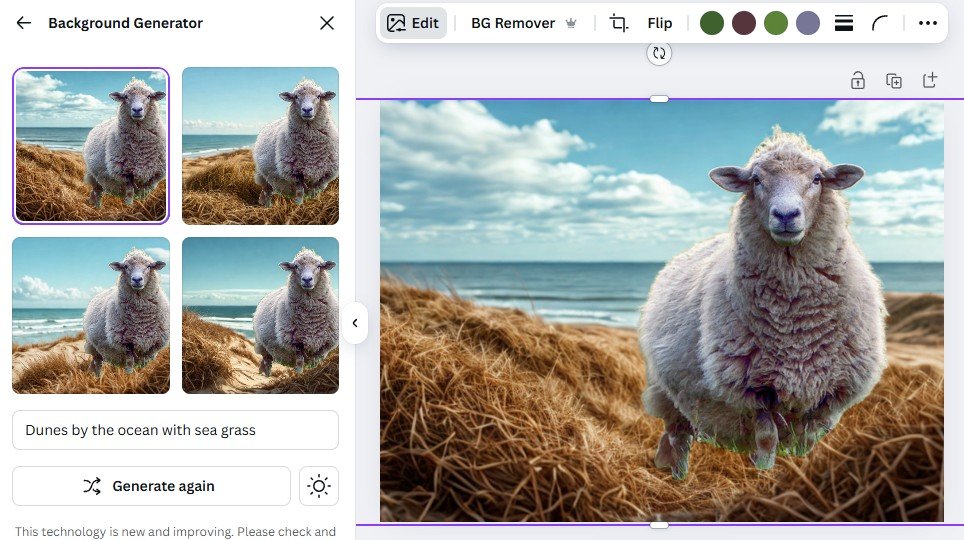
Canva AI operates on different premises: most small business visual content follows predictable patterns (social posts, presentations, one-pagers), and templates pre-loaded with best practices enable faster, more consistent output than starting from blank canvas.
The learning curve is compressed because Canva builds on familiar desktop publishing concepts. You choose a template category (Instagram story, business card, email header), then customize using drag-and-drop editing. AI features enhance this base workflow—Magic Design generates template variations from a single prompt, Magic Eraser removes unwanted elements from photos, Background Remover isolates subjects, and Text to Image creates illustrations within layouts.
This approach excels when your bottleneck is production capacity across multiple content types. A small agency team can maintain brand consistency while letting junior staff create social graphics, senior staff develop client proposals, and founders build investor decks—all using the same tool ecosystem. Templates encode design decisions (hierarchy, spacing, color harmony), reducing the creative burden on non-designers while ensuring outputs meet professional standards.

Canva’s business value concentrates in workflow consolidation. Instead of juggling Photoshop for image editing, PowerPoint for presentations, and Mailchimp for email graphics, one platform handles most routine visual production. A retail business owner can create promotional flyers, update their website hero image, design email campaigns, and produce Instagram stories without context-switching between applications.
The limitation is creative ceiling. Templates offer guardrails that prevent egregious design mistakes but also constrain uniqueness. When every business in your category uses Canva’s “Modern Startup” template set, differentiation erodes. For customer-facing materials where brand distinction matters less than clear communication (internal reports, process documentation, team onboarding decks), this trade-off favors speed. For hero brand moments (website homepage, major campaign launches), template dependence becomes liability.
Integration strength is Canva’s differentiator. Direct publishing to social platforms, team collaboration features, brand kit management, and version history make it a complete design operations platform rather than single-purpose tool. Businesses wanting to centralize visual workflow rather than optimize individual asset creation find stronger fit here.
Who Should Choose Another AI

Neither Ideogram 3.0 nor Canva AI serves every visual content need, and mismatched expectations waste time and budget. You should look elsewhere if:
You require legally compliant, audit-ready outputs in regulated industries (healthcare, finance, legal). AI-generated imagery carries authenticity and rights management questions that template-based design doesn’t fully resolve. Ideogram’s generated images may inadvertently reference copyrighted visual styles, while Canva’s stock library offers clearer licensing. However, both lack the rigorous asset provenance required for high-stakes marketing where image rights disputes carry significant liability. Traditional design services with explicit work-for-hire agreements remain safer for these contexts.
Your content demands are highly specialized within vertical-specific domains. Real estate marketing requires MLS-compliant property flyers with precise legal disclosures; restaurant menus need food photography that meets health department visual standards; medical education materials require anatomically accurate illustrations reviewed by subject matter experts. General-purpose AI design tools can’t encode the domain-specific rules and quality thresholds these scenarios demand—you need industry-specific software or professional services.

You’re producing low-variability, high-volume content where output consistency matters more than individual asset quality. Product catalog photography for e-commerce (hundreds of SKUs requiring identical lighting, angles, backgrounds) benefits from automated studio setups and batch processing workflows, not AI generation or template design. Similarly, architectural rendering, technical documentation diagrams, and engineering schematics require precision and standardization that creative AI tools can’t reliably deliver.
You have zero design judgment and need the AI to make strategic creative decisions, not just execute them. Both tools require you to know whether a layout works, whether colors align with brand, whether an image communicates the intended message. AI assists execution but doesn’t replace taste. If you can’t evaluate whether a social post is visually effective, these tools will simply let you produce ineffective content faster. Start with design education or hire contract help for initial brand foundation before adopting efficiency-focused AI.
Your goal is full design automation without human review or iteration. Current AI design tools generate options and reduce grunt work, but they don’t yet reliably produce publication-ready outputs without human judgment. Expecting to input a prompt and receive a finalized campaign asset ready for paid distribution leads to disappointment across both platforms.
Use Cases by Business Goal
Productivity
Internal operations visuals represent the strongest productivity case for both tools—creating content that drives internal efficiency but doesn’t require hero-level polish.
Ideogram 3.0 fits process documentation and training materials where you need custom diagrams explaining company-specific workflows. A logistics startup can generate warehouse layout visualizations, shipping flow diagrams, or safety procedure illustrations without hiring an illustrator. The investment is prompt iteration time (20-30 minutes per asset) rather than outsourcing budget (typically $200-500 per custom illustration). Quality threshold is “clearly communicates concept” not “portfolio-worthy,” making AI generation’s imperfections acceptable.
Canva AI serves routine reporting and presentation decks where speed and consistency outweigh uniqueness. Monthly team updates, client status reports, internal proposal documents—content that must look professional but won’t be scrutinized for creative distinction. A 10-person agency can maintain visual consistency across all client-facing documents by using shared templates, ensuring junior staff produce on-brand decks without senior review bottlenecks. Time savings compound: reducing deck creation from 2 hours to 30 minutes across 4 weekly meetings saves 6 hours of productive time per week.
The productivity trade-off differs meaningfully: Ideogram reduces cost for custom one-off visuals but increases time investment in prompt iteration. Canva reduces time for recurring content formats but requires upfront investment in template and brand kit setup. A consulting firm producing quarterly thought leadership reports needs Ideogram for unique diagrams illustrating proprietary frameworks. A marketing agency producing 50 social posts weekly needs Canva for template-based throughput.
Decision heuristic: If the same visual format repeats frequently (social posts, email headers, sales one-pagers), template-based productivity gains favor Canva AI. If you need diverse custom imagery with variable creative requirements, Ideogram’s generation approach prevents stock photo licensing costs and illustration outsourcing.
For ongoing productivity optimization, explore AI Efficiency strategies that extend beyond single-tool adoption.
Revenue / Marketing

Customer-acquisition content carries higher quality standards and competitive stakes than internal productivity use cases. Both tools enable revenue-focused marketing, but serve different campaign types.
Canva AI for campaign execution velocity shines in businesses running continuous, multi-channel marketing programs. A DTC e-commerce brand launching weekly product drops needs coordinated visuals across email, Instagram, Facebook ads, and website banners—all maintaining brand consistency while highlighting different products. Canva’s template system enables this coordination: create master template designs, duplicate across channels, swap product images and copy per SKU. One designer can manage output that previously required three.
Revenue impact shows in compressed campaign cycles. Reducing social campaign asset creation from 3 days to 4 hours means reacting to market trends before they expire. A business coach can create promotional graphics for a trending topic Monday morning and have paid ads running by afternoon, capitalizing on attention windows that multi-day production timelines miss. This velocity advantage compounds in businesses where offer frequency drives revenue—courses, events, limited-time promotions.
Ideogram 3.0 for brand differentiation supports positioning-focused marketing where visual uniqueness influences purchase decisions. A boutique consulting firm competing against established players needs brand assets that signal innovation and custom thinking—generic stock photos undermine that positioning. AI-generated hero images for website, pitch decks, and thought leadership content create subtle perception of investment and attention to detail.

The revenue connection is indirect but real. A design agency pitching a rebrand project can showcase “preview concepts” generated through Ideogram during the sales process, demonstrating creative direction without investing hours in client work pre-contract. Conversion rate improvements of 10-15% on high-value deals ($20-50K projects) justify prompt iteration time when traditional concepting would delay proposals by days.
Marketing limitations matter equally. Canva’s template ubiquity means your competitor’s Instagram feed may use identical layouts—differentiation comes from photography, copy, and brand colors, not structural design innovation. Ideogram’s outputs can feel “AI-generated” to audiences developing recognition for common AI visual artifacts (certain lighting patterns, compositional formulas, texture rendering). Neither tool replaces strategic creative direction that positions offerings compellingly.
Revenue decision filter: If you’re competing on execution speed and need to flood channels with on-brand content (e-commerce, coaching, events), Canva AI’s throughput advantages directly impact revenue. If differentiation and positioning drive purchase decisions (consulting, creative services, premium products), Ideogram’s unique visuals support brand perception that influences deal closure.
See AI Revenue Boost for frameworks connecting AI tool selection to specific revenue models.
Systemization / Automation
Long-term business value from AI design tools depends on integrating them into repeatable workflows, not just using them for one-off projects.
Canva AI supports operational design systems where visual content creation becomes routine business process rather than creative project. A SaaS company implementing customer case study production as standard onboarding deliverable can create a Canva template system: interview customer, populate template with quotes and metrics, add logo and product screenshots, publish. Process moves from marketing project requiring design resources to account management workflow any team member executes.
Systemization value grows with team size and content volume. A franchise organization can deploy branded templates to 50 franchise owners, ensuring local marketing matches brand standards without centralized design approval. Brand compliance that previously required review bottlenecks becomes automated through template guardrails. Risk reduction (off-brand materials damaging reputation) and efficiency gains (eliminating review cycles) both contribute value.
Technical integration is Canva’s strength: API access, team permissions, folder structures, and approval workflows turn it into content operations infrastructure. A mid-sized business can build “request Canva design” into their project management tool, assign work to distributed team members, and track completion without email chaos.

Ideogram 3.0 fits workflow automation differently—as an asset generation step within broader content production systems. A content marketing agency publishing 20 blog posts monthly can systematize featured image creation: writer provides topic and key themes, junior team member generates 3-5 Ideogram options following a prompt template, editor selects best option and adds to CMS. This transforms custom illustration from expensive blocker (outsource for $150-300 per post) to routine production step (15 minutes of junior staff time).
The systemization challenge is quality variability. Template-based workflows deliver consistent outputs because templates constrain variables. Prompt-based generation introduces randomness that requires human judgment loops. You can systematize the process (who creates prompts, who reviews outputs, what approval threshold) but not eliminate human evaluation.
Automation decision lens: If your goal is enabling non-specialists to produce compliant, on-brand content without creative decision-making (franchise marketing, distributed teams, high-volume social), Canva’s template system provides the structure needed for delegation and scale. If you’re systematizing custom asset creation currently handled through outsourcing or time-intensive manual work (illustration, concept visualization, hero imagery), Ideogram reduces unit economics but requires defining quality standards and review workflows.
For comprehensive workflow automation approaches, see Solo DX and AI Workflows.
AI Comparison Table + Explanation
| Axis | Ideogram 3.0 | Canva AI |
|---|---|---|
| Ease of Use | Moderate—requires prompt writing skills and iteration comfort; interface is minimal but outputs need refinement | High—familiar template model with drag-and-drop; AI features enhance rather than replace core functionality |
| Best For | Businesses needing unique, custom imagery that doesn’t exist in stock libraries; original illustrations and concept visualizations | Teams producing high-volume, multi-format content needing brand consistency; social media, presentations, marketing collateral |
| Strengths | Text-accurate image generation; creative differentiation; eliminates stock photo licensing costs; produces novel visual assets | Template library; all-in-one platform; team collaboration; brand kit management; direct social publishing; faster learning curve |
| Limitations | Requires clear creative vision; no layout tools; outputs need post-processing; quality variance across generations; standalone tool | Template dependency limits uniqueness; creative ceiling; outputs can feel generic; AI features supplement rather than replace core workflow |
| Pricing Perception | Usage-based or subscription tiers; cost-effective vs. illustration outsourcing ($200-500 per asset) but time-intensive vs. stock photos ($10-50) | Free tier available; Pro tiers competitive with Adobe; cost spread across multiple use cases makes per-asset economics favorable for high-volume users |
This comparison reveals a fundamental choice: ingredient tool vs. complete platform.
Ideogram functions like a specialized ingredient supplier—it produces one thing (AI-generated images) extremely well, which you then incorporate into broader workflows using other tools. This specialization makes sense when that specific ingredient (unique imagery) is your constraint and you have systems to handle everything else (layout, brand management, distribution). A business already using design tools but frustrated by stock photo limitations or illustration costs finds clean fit.
Canva operates as complete platform—covering image editing, layout, brand management, collaboration, and distribution in one ecosystem. This consolidation makes sense when workflow fragmentation is your problem and you’d rather optimize fewer tools than coordinate specialists. A team juggling Photoshop, PowerPoint, Mailchimp, and social media platforms can collapse that stack into Canva, simplifying operations at the cost of specialist depth.
Your business maturity and goals determine fit. Early-stage businesses (0-2 years) benefit from Canva’s all-in-one approach—you’re still defining brand and content strategy, so template guidance prevents common mistakes while you develop taste. Trying to master prompt engineering when you’re also learning business fundamentals creates unnecessary complexity.
How to Choose the Right AI
Decision checkpoints for matching tool to situation:

Budget analysis should include time costs, not just subscription fees. Canva Pro at $120/year seems cheap, but if template constraints force you back to hiring designers for hero moments, actual costs are Canva subscription plus design outsourcing. Ideogram’s per-generation costs appear higher until you compare against illustration outsourcing ($200-500 per custom asset) or stock photo licensing fees accumulating across campaigns. Calculate total cost including opportunity cost of time spent learning and using each tool.
Time-to-output requirements differ by tool architecture. Canva excels at compressed timelines for template-based content—create 10 social posts in an hour because structure is pre-defined. Ideogram requires longer iteration cycles for individual assets but eliminates sourcing and licensing delays for custom imagery. A campaign launching in 48 hours favors Canva; a website refresh with month-long timeline accommodates Ideogram’s iteration.

Team technical skills matter more than marketing admits. “Easy to use” Canva still requires design judgment—understanding visual hierarchy, color harmony, typography pairing. If your team lacks this foundation, templates provide guardrails but don’t teach principles. Ideogram demands prompt engineering skills and iteration comfort—essentially, translating visual imagination into text descriptions then evaluating results. Teams comfortable with experimental, iterative workflows adapt faster than those expecting deterministic, recipe-based tools.
Review and compliance needs shape tool selection for businesses with brand approval gates or regulatory requirements. Canva’s template system makes compliance easier—define approved templates, restrict editing permissions, enforce brand kit usage. Outputs stay within guardrails. Ideogram’s generative nature introduces unpredictability requiring human review loops. If every asset needs legal approval before publication, Ideogram’s variance creates review burden; if creative staff has approval authority, variance enables exploration.
Common mistakes revealing poor tool-market fit:

Choosing based on feature demos rather than workflow context—Ideogram’s impressive image generation in marketing videos doesn’t help if your actual bottleneck is producing 50 on-brand social posts weekly, not creating unique hero images. Canva’s massive template library is irrelevant if you need custom product visualization that templates can’t address.
Treating AI as designer replacement rather than efficiency tool—both platforms augment human judgment, they don’t eliminate need for creative direction. Expecting to input vague prompts and receive publication-ready outputs leads to frustration. You still need to know what good looks like, understand your brand, and evaluate whether outputs serve business goals.
Underestimating the importance of workflow integration—standalone tools that don’t connect to your existing systems create friction. If your team lives in Microsoft ecosystem, Canva’s lack of native PowerPoint integration means export/import steps that slow adoption. If your content workflow centers on WordPress, neither tool publishes directly, requiring manual upload processes.
Selection framework: Map your primary content bottleneck, then match tool strengths.
- Bottleneck: Production capacity for templated content ? Canva AI
- Bottleneck: Cost of custom imagery ? Ideogram 3.0
- Bottleneck: Team design skills ? Canva AI (templates compensate)
- Bottleneck: Brand differentiation ? Ideogram 3.0 (unique outputs)
- Bottleneck: Multi-tool workflow chaos ? Canva AI (consolidation)
For decision frameworks connecting tool selection to business strategy, see AI Workflows.
FAQs

Is Canva AI better than Ideogram for small business social media graphics?
Canva AI serves most small business social media needs more effectively because social content requires high volume, brand consistency, and format variety (posts, stories, reels)—strengths of template-based design. You can produce a week’s worth of coordinated social graphics in an hour using Canva’s template system and brand kit. Ideogram would require 15-20 minutes per unique image generation, making it impractical for daily posting schedules. However, if your social strategy differentiates through visual uniqueness rather than posting frequency, Ideogram’s custom imagery might justify the time investment for hero posts or campaign launches.
Can I use Ideogram 3.0 to replace stock photo subscriptions entirely?
Partially, depending on your imagery needs. Ideogram excels at generating conceptual illustrations, abstract visuals, and custom scenes that align with specific messaging—use cases where stock photos require extensive searching and rarely match exactly. It struggles with photorealistic imagery of real products, recognizable locations, or specific people, where stock photography maintains advantages in authenticity and legal clarity. A hybrid approach works best: use Ideogram for unique concept visuals and metaphorical imagery, maintain limited stock subscription for product photography, lifestyle imagery, and shots requiring legal model releases. This reduces stock licensing costs by 60-70% while ensuring access to imagery types AI generation can’t reliably produce.
Which tool has a shorter learning curve for non-designers?
Canva AI requires less time to productive output because it builds on familiar concepts (templates, drag-and-drop editing) and constrains decisions through pre-designed options. A non-designer can create professional-looking social posts within their first hour using Canva. Ideogram demands developing prompt engineering skills and comfort with iteration—understanding how to describe visual concepts in text, then refining through multiple generations. This typically requires 5-10 hours of practice before consistently generating usable outputs. However, “shorter learning curve” doesn’t mean “no learning required”—Canva still demands design judgment for brand-appropriate color selection, layout hierarchy, and typography pairing. The difference is Canva teaches through template examples while Ideogram requires independent visual conceptualization.
Next Steps

Ready to implement AI design tools strategically?
- Compare AI – Explore additional tool comparisons for writing, automation, and business AI
- AI Efficiency – Learn frameworks for measuring and optimizing AI tool ROI
- AI Revenue Boost – Connect design automation to revenue-generating workflows
- Solo DX – Build complete digital transformation strategies for small teams
- AI Workflows – Implement repeatable processes for AI-powered content production
Leave a Reply