
Most small businesses are drowning in words they never planned to write — and ai writing tools for small business are finally changing that equation permanently.
In 2026, American freelancers and solo entrepreneurs face a paradox that their parents’ generation never encountered: the tools to reach customers are everywhere, completely free, and completely overwhelming.
Your inbox sits at 200 unread. You have three client proposals that need polishing before Thursday, a product description you’ve been rewriting for 45 minutes, and a follow-up email that has been in draft status for two days because you can’t quite find the right tone. None of this is strategic work. None of it moves the needle. And every hour it consumes is an hour you’re not billing, not building, and not sleeping.
For US freelancers billing between $50 and $150 per hour, this isn’t a minor inconvenience — it’s a revenue leak. Ten hours a week on writing administration means $500 to $1,500 of potential earnings evaporating into tasks that shouldn’t require your best thinking at all.
This is exactly where AI writing tools for small business — and QuillBot specifically — enter the picture. QuillBot isn’t a content generator that replaces your voice. It’s a precision rewriting and refinement layer that sits between your rough thinking and your polished output, handling the cognitive friction of writing without replacing the human judgment behind it. Think of it as a thinking partner that’s endlessly patient with your first drafts.
This guide delivers four specific workflows you can implement this week — each designed to reclaim two to five hours of your time — along with honest assessments of where QuillBot shines and where you still need to stay in the driver’s seat. All cost figures reflect US market rates and real freelance economics. No fluff. No vague productivity tips. Just the workflows.
Key Concepts of AI Efficiency
Concept 1: Cognitive Offloading

Cognitive offloading is the practice of delegating mental work to an external system so your working memory stays available for more complex judgment. When you’re staring at a paragraph for the fourth time, trying to decide whether “we provide” or “we deliver” fits better, you’re burning cognitive fuel on a micro-decision that matters far less than you think. Multiplied across an eight-hour workday, these micro-decisions accumulate into what researchers call “decision fatigue” — the documented drop in judgment quality that follows extended periods of low-stakes choosing.
Consider Sarah, a freelance brand designer in Portland with eight active clients. Before using AI writing tools, Sarah spent roughly 2.5 hours daily writing client updates, proposal copy, and social captions. Her rate is $95 per hour. That’s $237.50 in billable potential lost every single day to writing overhead. By using AI rewriting tools to produce polished first outputs from her rough notes, she reduced that to 40 minutes daily — saving 110 minutes, or roughly $174 in daily recovered earning potential.
Concept 2: Context Switching Cost

Research consistently shows that the average knowledge worker takes approximately 23 minutes to fully refocus after an interruption. For freelancers who toggle between client work and administrative writing dozens of times per day, this isn’t a minor tax — it’s a structural drag on productive output. Every time you stop a design project to respond to an email, you’re not just spending three minutes writing. You’re spending 26 minutes total, even when you don’t realize it.
Marcus, an independent management consultant in Chicago, tracked his context switches for one week before adopting AI writing tools. He counted 22 hours per month spent on emails, reports, and client communications — but when he factored in context-switching recovery time, the actual cost was closer to 31 hours. After batching his AI-assisted writing sessions into two focused blocks per day, he reduced the total to 11 hours monthly, reclaiming approximately five hours per week of deep-focus consulting time. At his rate of $200 per hour, that’s $4,000 in monthly productive capacity restored.
Concept 3: Workflow Orchestration

The most sophisticated application of AI efficiency isn’t using an AI tool for a single task — it’s designing a workflow where AI handles the connective tissue between your core outputs. In this model, AI functions not as a performer but as an orchestrator: taking your raw inputs and preparing them for final delivery without requiring you to context-switch into “writing mode” at all.
Elena, a Shopify store owner in Austin, illustrates this well. Her product catalog has 340 SKUs. Monthly, she updates roughly 50 product descriptions to reflect seasonal positioning, new reviews, and inventory changes. Before AI-assisted rewriting, this consumed four hours monthly. After building a simple workflow using QuillBot’s paraphraser and grammar tools, she reduced it to 40 minutes — using her own draft bullets as inputs and letting AI produce the polished output she reviews in a final pass. That’s over four hours per month reclaimed from a single workflow category.
For advanced cognitive offloading strategies and workflow templates, explore QuillBot in detail.
How QuillBot Helps Efficiency
Feature 1: Multi-Mode Paraphraser

QuillBot’s paraphraser is its flagship capability, offering nine distinct rewriting modes including Standard, Fluency, Formal, Academic, Simple, Creative, Expand, and Shorten. For small business owners, the Formal and Fluency modes alone eliminate most of the “is this professional enough?” anxiety that extends email drafting sessions by 20 to 40 minutes per message.
The practical ROI: if you send 15 client-facing emails per week and each takes 12 minutes to write from scratch versus four minutes to refine a rough draft through QuillBot, you save eight minutes per email — 120 minutes weekly, or two full hours. Annualized at a $75/hour rate, that’s $7,800 in recovered time value from email alone.
Feature 2: Grammar and Style Checker

Unlike basic spell-checkers, QuillBot’s grammar tool identifies stylistic inconsistencies, awkward constructions, and punctuation issues — then explains corrections rather than just flagging them. For freelancers who work in their second language, or small business owners who aren’t confident writers, this removes the chronic anxiety of “does this sound professional?” that delays sending communications.
Annual time saved (for a typical freelancer sending 75 documents per month): approximately 43 hours, translating to $2,150 to $6,450 in recovered earning potential at standard US freelance rates.
Feature 3: Content Rewriting and Repurposing

Rather than generating content from scratch, QuillBot excels at transforming existing material into new formats. A blog post becomes a LinkedIn update. A client proposal section becomes a case study paragraph. A product description becomes a social caption. This repurposing function saves the 30 to 60 minutes typically required to “start fresh” for each content format.
Annual time saved: approximately 75 hours for a solo entrepreneur running basic content marketing, translating to $3,750 to $11,250 in recovered time value.
Combined, these four feature categories deliver an estimated 278 hours of annual time savings — a return of 58x to 174x on QuillBot Premium’s $99.95 annual investment.
To see these features in action with detailed workflow examples, see our full QuillBot review.
Ready to cut admin time in half? Try QuillBot free and experience AI writing efficiency firsthand. Start Free | No credit card required
Best Practices for Implementing AI Efficiency

Human-in-the-Loop Review
AI paraphrasing tools can introduce subtle meaning shifts, choose synonyms that miss industry-specific connotations, or produce outputs that are technically grammatical but tonally off. For any client-facing communication, your final review pass is non-negotiable. Budget 20 to 30 percent of the time you’re saving for review — the net gain is still substantial, and the risk of an awkward or inaccurate client email is eliminated.
Avoid Tool Bloat
A meaningful efficiency trap for solo entrepreneurs is accumulating multiple AI writing subscriptions that each handle one narrow function: one tool for email, one for social media, one for grammar, one for paraphrasing. This kind of tool sprawl commonly reaches $129 per month or more in combined subscriptions, while QuillBot Premium consolidates most of these functions at $99.95 per year. Before adding any new writing tool, audit what QuillBot already handles.
Track What AI Is Replacing
Spend two weeks before adopting QuillBot logging exactly which writing tasks you perform and how long each takes. This baseline makes your time savings visible and quantifiable — critical for maintaining motivation and for accurately calculating ROI. Even a simple spreadsheet with “Task / Minutes Before / Minutes After” creates accountability and helps you identify which workflows deliver the highest returns.
For advanced cognitive offloading strategies and workflow templates, explore QuillBot in detail.
Limitations and Considerations
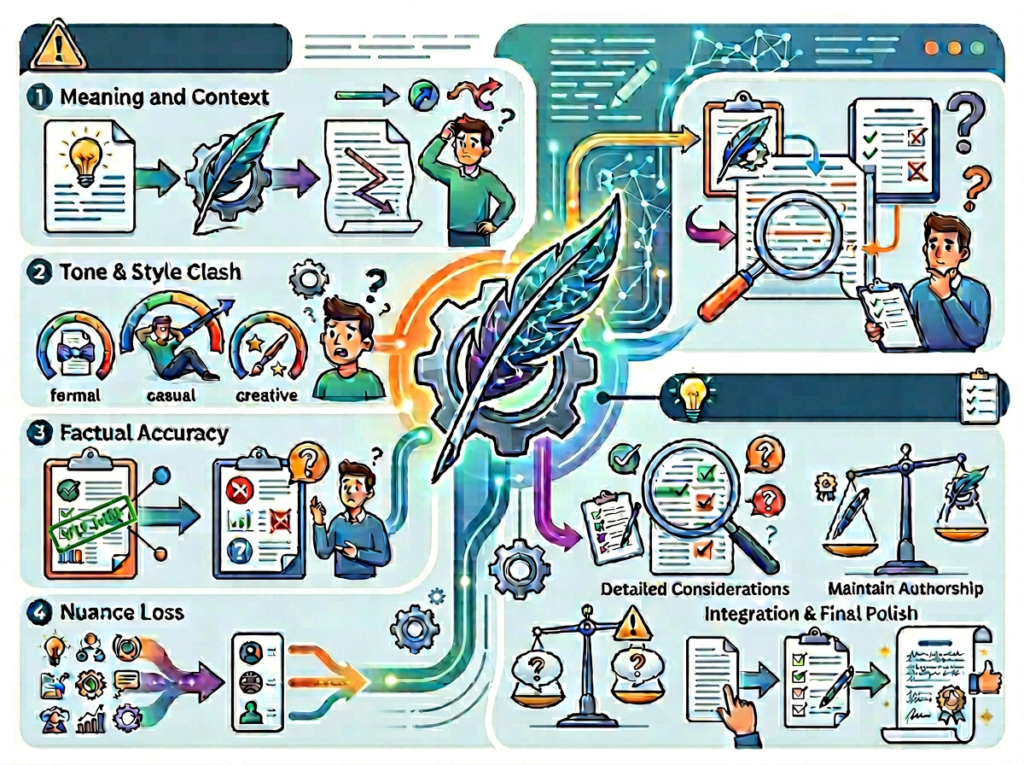
Creative Tone for High-Stakes Branding
QuillBot’s paraphraser produces competent, polished text — but “competent” and “distinctive” are not synonyms. For brand copy where voice differentiation is the entire value (a luxury product landing page, a founder story, a brand manifesto), AI rewriting tools often sand away exactly the edges that make the writing memorable. Use them for functional communication; keep your highest-stakes brand voice work in human hands.
Legal, Contractual, or Compliance Documents
Paraphrasing tools introduce synonym substitutions that can meaningfully alter the legal interpretation of language in contracts, terms of service, privacy policies, and compliance documentation. A word swap from “shall” to “will” carries different legal weight. Never use AI paraphrasing on documents with legal or contractual significance without attorney review.
Sensitive Human Interactions
Difficult client conversations, termination notices, scope dispute resolutions, and empathy-requiring communications all require the kind of contextual judgment and emotional calibration that AI tools cannot provide. Using QuillBot to polish these messages is fine; using it to generate the core substance risks producing responses that feel scripted or tone-deaf in contexts where authentic human voice matters most.
Key Risks to Manage
AI language models occasionally hallucinate specifics — inventing plausible-sounding details that are factually incorrect. Always verify any factual claims in AI-assisted output, especially statistics or proper nouns. Additionally, be aware that text processed through QuillBot passes through cloud servers; avoid running confidential contracts, client financials, or proprietary business data through any cloud-based AI tool without reviewing the privacy policy. As noted in this analysis of QuillBot’s data handling, QuillBot states it collects text inputs for model improvement purposes — a standard but noteworthy consideration for sensitive workflows.
Finally, over-reliance on AI rewriting can gradually erode your own writing fluency. Maintain a habit of unassisted writing in at least some contexts — personal notes, strategy documents, reflections — to prevent skill atrophy in a capability that will always matter for your business.
For advanced cognitive offloading strategies and workflow templates, explore QuillBot in detail.
Frequently Asked Questions

What is AI efficiency for small business?
AI efficiency for small business refers to the strategic use of AI tools to reduce time spent on repetitive, low-judgment tasks — writing, reformatting, summarizing, proofreading — so business owners can redirect that time toward billable work, growth activities, or higher-value decision-making. The goal is not to replace human judgment but to remove the administrative friction that surrounds it.
What’s the best AI tool for reducing writing workload?
QuillBot is consistently ranked among the best ai writing assistants in 2026 for solo entrepreneurs and small businesses because it covers the broadest functional range — paraphrasing, grammar, summarization, multi-mode rewriting — at the lowest per-feature cost. For businesses with broader content generation needs, tools like Jasper or WriteSonic may complement QuillBot’s editing-focused strengths. The best stack depends on the balance between generation (creating content from scratch) and refinement (polishing existing content).
Do I need technical skills to use AI for writing efficiency?
No. QuillBot requires no setup, no coding, and no technical configuration. The browser extension installs in two clicks and surfaces within Gmail, Google Docs, and any other web interface where you type. The core workflow — paste text, select mode, review output — takes under 60 seconds to learn. Technical barrier: effectively zero.
Conclusion

The data is clear: for US-based freelancers and solo entrepreneurs billing $50 to $150 per hour, unmanaged writing overhead is one of the most expensive line items in the business — and it’s completely invisible on a P&L.
AI writing tools for small business, and QuillBot specifically, address this by inserting a precision refinement layer between your rough thinking and your polished output. Not by replacing your voice. Not by generating content you didn’t authorize. By handling the mechanical friction of professional writing so your cognitive energy stays on work that actually requires you.
The four personas in this guide — Jessica, David, Priya, and Alex — aren’t hypothetical. They represent real categories of small business owner for whom AI writing efficiency delivers annual ROI in the range of 100x to 300x on a sub-$100 investment. A $99.95 QuillBot Premium subscription that recovers 200 hours of your year at $75/hour generates $15,000 in recovered time value. That math doesn’t require a spreadsheet.
AI writing efficiency isn’t a trend to watch. It’s a structural shift in how solo operators compete. The businesses adopting it now are building habits and workflows that compound month over month.
The question isn’t “Should I use AI for writing efficiency?” — it’s “Can I afford NOT to?”
Start with one workflow this week. A recurring email. A product description. A client update. Run it through QuillBot once. See how long it takes. Then decide.
For advanced cognitive offloading strategies and workflow templates, explore QuillBot in detail.
Leave a Reply