If you’re a small business owner, freelancer, or non-technical manager trying to use AI for coding tasks, the choice between ChatGPT and Claude 4 isn’t about which one is “better”—it’s about which one fits your actual workflow. ChatGPT excels at quick prototyping, broad language support, and integrating with tools like GitHub Copilot. Claude 4 stands out in complex reasoning, reading long documentation, and producing maintainable code with fewer logic errors. For general-purpose programming support in small businesses, ChatGPT is often the faster starting point for common tasks, while Claude 4 becomes essential when you need to understand legacy code, refactor systems, or work through ambiguous requirements. Neither replaces a developer, but both can dramatically reduce the gap between “I need this built” and “it’s working.”
Table of Contents
Introduction: Why This Comparison Matters

Choosing between ChatGPT and Claude 4 for programming feels overwhelming because the marketing around AI coding assistants focuses on capabilities, not decisions. Both tools can generate code, debug errors, and explain technical concepts, but they approach these tasks differently in ways that matter for real business outcomes. If you’re running a small business without a full-time developer, or if you’re a freelancer managing client projects with mixed technical requirements, you need to know which AI will actually save you time versus which one will create more work through revisions and misunderstandings.
This comparison cuts through the hype by focusing on practical business contexts: when you need to build an internal tool quickly, when you’re maintaining code someone else wrote, when you’re trying to integrate APIs without a computer science degree, or when you’re deciding whether to invest time learning a coding workflow at all. The goal isn’t to declare a winner, but to help you make an informed choice based on your current skills, project complexity, and how much cognitive load you can handle while running everything else in your business. Understanding the trade-offs between chatgpt vs claude 4 for programming means recognizing that the best ai for developers in a startup might not be the best ai programming assistant for a solo consultant, and that coding ai tools only create value when they match your actual decision-making speed and technical comfort level.
Who This Comparison Is Best For
This comparison is designed for business operators who need code but don’t write it full-time. You might be a freelance consultant who needs to automate client reporting, a small agency owner building internal dashboards, a solopreneur creating a SaaS MVP, or a non-technical founder working with offshore developers who need to review pull requests. The common thread is that programming isn’t your core skill, but ignoring it completely means either overpaying for simple tasks or bottlenecking your business on developer availability.
The typical pain points you’re experiencing include: spending too much time explaining requirements to contractors, getting quoted four-figure prices for what feels like a simple automation, maintaining code you inherited but don’t fully understand, or feeling stuck between learning to code properly versus just “getting it done” with AI. You’ve probably tried using an AI coding assistant before and found it either produced broken code you couldn’t debug, or worked perfectly once but then failed mysteriously when you tried to modify it. The confusion isn’t about whether AI can help—it clearly can—but about which tool will actually reduce your workload rather than add a new learning curve on top of everything else.

Common mistakes in this situation include choosing an AI based on social media hype rather than your actual project needs, expecting AI to replace all developer work when it’s really best suited for specific tasks like scaffolding, refactoring, or documentation, and underestimating how much domain knowledge you still need to validate AI-generated code. For example, a freelancer building a client portal might choose ChatGPT because it’s popular, spend days fighting authentication bugs, and conclude that “AI coding doesn’t work”—when the real issue was that the task required understanding OAuth flows, which neither AI explains well without proper context. Conversely, a manager reviewing legacy PHP code might use Claude 4 to analyze the entire codebase, get valuable insights about technical debt, but then struggle to implement quick fixes because Claude’s suggestions are thorough but not always copy-paste ready.
The ideal reader for this comparison is someone who values decision speed over perfection, needs ai for small business contexts where hiring a full-time developer isn’t justified, and wants to understand when to use AI tools versus when to delegate or skip the task entirely. You’re not trying to become a professional developer—you’re trying to make informed trade-offs about which technical problems to solve in-house, which to outsource, and which to ignore until your business scales.
Why Each AI Fits That Need
ChatGPT for Programming
ChatGPT’s primary strength in programming support is its speed and accessibility for common tasks. If you need to write a Python script to parse CSV files, create a basic REST API endpoint, or convert a manual process into a simple automation, ChatGPT will typically give you working code faster than Claude 4. This isn’t because it’s inherently smarter, but because OpenAI has trained the model on a massive corpus of code examples, StackOverflow answers, and GitHub repositories, making it exceptionally good at pattern-matching against common programming problems.
The learning curve is minimal if you’re already comfortable with conversational AI. You describe what you want in plain English, ChatGPT generates code, and you can iterate quickly by saying “now make it handle errors” or “add logging.” For small businesses, this translates to tangible results: a solo consultant can build a client data dashboard in an afternoon, a freelancer can automate invoice generation without learning accounting software APIs, or a manager can prototype an internal tool to show developers what they actually want. The business result ChatGPT supports best is rapid prototyping and task completion when the problem is well-defined and you need output fast.
ChatGPT also integrates well with the broader OpenAI ecosystem, including GitHub Copilot for in-editor suggestions and custom GPTs that can be pre-configured with your coding standards or company documentation. If you’re working in popular languages like JavaScript, Python, or TypeScript, the model’s suggestions tend to follow current best practices. However, the trade-off is that ChatGPT prioritizes plausible-sounding code over deeply reasoned solutions. It might give you a function that works for your test case but breaks under edge conditions you didn’t think to mention, or it might suggest a library that’s deprecated because the training data is older. For business users, this means ChatGPT is excellent when you can test the output immediately and iterate, but less reliable when you need code that will run unsupervised or handle complex state management.
Claude 4 for Programming
Claude 4 excels at complex reasoning and contextual understanding, which makes it particularly valuable when you’re working with ambiguous requirements, legacy codebases, or situations where you need to understand why something works, not just that it works. Anthropic designed Claude with longer context windows and stronger instruction-following capabilities, meaning you can paste an entire project’s worth of code, ask “why is this authentication flow failing for mobile users,” and get a thoughtful analysis that considers multiple interconnected files.
The learning curve is slightly higher because Claude 4’s responses are more verbose and educational. Instead of just giving you a fixed function, it might explain the trade-offs between three different approaches, which is invaluable if you’re trying to build maintainable systems but can feel like overkill if you just need a quick script. For small businesses, this translates to better long-term outcomes: a founder reviewing code from a contractor can use Claude 4 to understand whether the implementation is solid or full of shortcuts, a freelancer can refactor a client’s messy codebase with confidence that the changes won’t introduce new bugs, or a manager can document internal tools by having Claude analyze the code and generate plain-English explanations.
The business result Claude 4 supports best is decision-making quality and system reliability. It’s the tool you use when getting it right matters more than getting it fast, when you’re working on projects that will need maintenance six months from now, or when you need to explain technical decisions to non-technical stakeholders. Claude 4 is also stronger at multi-step reasoning tasks like debugging logic errors across multiple functions, refactoring code to improve performance, or generating comprehensive test cases. However, it’s slower to iterate with for simple tasks—asking Claude to write a basic CRUD API might result in a well-architected solution with error handling and documentation, which is great for production but overkill if you just need a proof of concept by end of day.
Both tools support general-purpose programming, but they optimize for different business constraints: ChatGPT minimizes time-to-output, while Claude 4 minimizes cognitive load for complex decisions.
Who Should Choose Another AI

If your programming needs fall into specific categories, neither ChatGPT nor Claude 4 may be the right choice, and recognizing this early saves significant frustration. Highly regulated industries with strict compliance requirements—such as healthcare applications handling PHI, financial services with SEC reporting obligations, or government contractors with security clearances—often need AI tools with certified data handling and audit trails. General-purpose AI assistants process your code through cloud APIs, which creates compliance risks that generic terms of service don’t adequately address. In these cases, you’re better off with on-premise code analysis tools or AI platforms specifically designed for regulated environments.
Projects requiring low-variability, deterministic output are another poor fit. If you’re building systems where even small inconsistencies cause problems—like generating legal contracts, producing financial calculations that must match specific standards, or creating medical device software—rule-based code generators or domain-specific tools will be more reliable than conversational AI. A template engine with validation rules won’t surprise you with creative interpretations of your requirements, whereas both ChatGPT and Claude 4 might occasionally misunderstand context or introduce subtle variations in output format.

Highly vertical-specific solutions often have better alternatives than general-purpose coding assistants. If you’re working exclusively in Salesforce development, there are AI tools trained specifically on Apex and Visualforce that understand the platform’s quirks better than ChatGPT or Claude. Similarly, game development in Unity, embedded systems programming, or blockchain smart contract development all have specialized AI tools and communities that provide more targeted support. The general-purpose nature of ChatGPT and Claude 4 means they’re competent across many languages but not expert in any single niche ecosystem.
Finally, if your business model depends on building proprietary AI technology itself—not just using AI as a tool—you’ll need to move beyond conversational assistants to working directly with model training, fine-tuning, and custom deployment. ChatGPT and Claude 4 are consumption tools, not development platforms for AI research. Recognizing when you’ve outgrown these tools, or when your use case never fit them in the first place, is as important as knowing when to adopt them.
Use Cases by Business Goal
Productivity
For internal productivity tools, both ChatGPT and Claude 4 can dramatically reduce the time spent on repetitive technical tasks, but they excel in different scenarios. ChatGPT is the faster choice when you need to build quick automation scripts: converting spreadsheet data into formatted reports, scraping information from websites for competitive research, or creating Slack bots that remind your team about deadlines. These are tasks where the requirements are straightforward, the scope is limited, and you mainly need something that works today without extensive future maintenance.
A typical productivity win with ChatGPT looks like this: a small marketing agency needs to pull client campaign data from three different platforms (Google Ads, Facebook, LinkedIn), normalize the metrics, and generate a weekly summary. Instead of manually copying data for an hour every Monday, the agency owner describes the process to ChatGPT, which generates a Python script using each platform’s API. The owner runs it locally, catches a few authentication errors that ChatGPT helps debug, and within two hours has a working solution that saves five hours weekly. The trade-off is that when LinkedIn changes their API in six months, the script breaks, and the owner needs to troubleshoot again—but the accumulated time savings still justify the approach.

Claude 4 becomes the better productivity choice when you’re working with internal dashboards or systems that multiple people will use. Its stronger reasoning about edge cases and error handling means you’re less likely to build something that works on your machine but fails for colleagues. For example, a small SaaS company might use Claude 4 to build an internal admin panel that lets customer support reset user passwords, view subscription status, and generate refund credits. Claude 4’s ability to consider security implications—like ensuring the panel validates permissions properly and logs all actions—makes it more suitable for tools where mistakes have business consequences.
The limitation for both tools is that they don’t replace proper software architecture. If your productivity automation starts touching customer data, integrating with payment systems, or becoming mission-critical, you’ve reached the point where hiring a developer or using a managed platform makes more sense than cobbling together AI-generated scripts. The cognitive load of maintaining increasingly complex homegrown tools eventually outweighs the cost of proper solutions.
For maximizing productivity outcomes with AI coding support, explore more strategies in AI Efficiency.
Revenue / Marketing
Programming skills intersect with revenue generation primarily through marketing automation, content personalization, and conversion optimization. ChatGPT has a significant advantage here because of its speed and integration with marketing-focused tools. If you need to generate dynamic email campaigns with personalized subject lines, build landing page variants for A/B testing, or create chatbots that qualify leads, ChatGPT’s ability to quickly produce working code for common marketing platforms (Mailchimp, HubSpot, WordPress) makes it the practical choice.
A revenue-focused use case might look like this: a freelance consultant wants to create a custom lead magnet—an interactive ROI calculator that potential clients can use on their website. With ChatGPT, the consultant describes the calculation logic, specifies that it should work as an embeddable widget, and receives HTML/CSS/JavaScript that can be added to any webpage. Within a few hours, the consultant has a working tool that generates qualified leads by collecting user inputs (company size, current spend, goals) in exchange for a personalized report. The speed-to-market here directly impacts revenue because the tool goes live this week instead of waiting for a developer’s availability.
Claude 4’s advantage in revenue contexts emerges when you need nuanced copywriting logic or multi-step conversion funnels. For instance, if you’re building a sophisticated email nurture sequence that changes messaging based on user behavior—opened but didn’t click, clicked but didn’t convert, converted but didn’t renew—Claude 4 better understands the conditional logic and can help architect a system that doesn’t break when you add new branches. It’s also stronger at integrating with analytics: you can share your Google Analytics event tracking code, explain your conversion goals, and have Claude generate the JavaScript to properly track micro-conversions throughout the funnel.
The trade-off is that ChatGPT optimizes for shipping fast, which matters when you’re testing revenue hypotheses and need to validate assumptions quickly. Claude 4 optimizes for getting the logic right, which matters when you’re scaling a proven strategy and can’t afford to lose leads due to bugs. For small businesses, this often means starting with ChatGPT to prove the concept, then potentially rebuilding with Claude 4 (or hiring a developer) once you have revenue flowing and know the system needs to be bulletproof.
Discover more ways to leverage AI for business growth in AI Revenue Boost.
Systemization / Automation
Long-term business systemization—the process of documenting workflows, creating repeatable processes, and building tools that work without constant supervision—requires different programming support than quick productivity hacks. ChatGPT works well for initial automation setup where you’re connecting existing tools through APIs: making your CRM automatically update when payment succeeds, syncing customer data between platforms, or triggering notifications when specific events occur. These are valuable systemization wins because they remove manual handoffs and reduce errors.
However, ChatGPT’s limitations become apparent when systems need to evolve. A small e-commerce business might use ChatGPT to build a script that processes daily orders, updates inventory, and sends shipping notifications. This works great until the business adds international shipping, needs to handle returns, or wants to integrate with a new fulfillment partner. Each change requires going back to ChatGPT, explaining the modification, and hoping the generated code doesn’t break existing functionality. The cumulative technical debt of repeatedly patching AI-generated automation can eventually exceed the cost of building it properly from the start.
Claude 4’s strength in systemization comes from its ability to understand and maintain architectural coherence across multiple related systems. When you’re building interconnected automations—like a complete order-to-fulfillment pipeline that touches your website, payment processor, inventory system, shipping API, and customer support tools—Claude 4 can better reason about how changes in one part affect others. You can share your entire automation codebase, explain a new business requirement, and receive suggestions that account for existing logic rather than just adding patches.
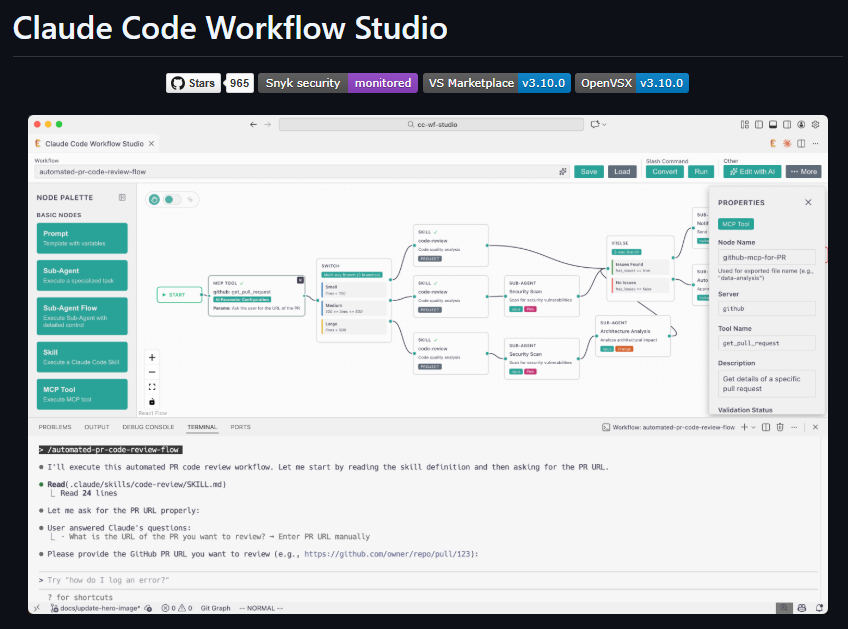
A realistic systemization scenario: a small subscription business has grown to the point where manual operations are breaking down. The founder uses Claude 4 to audit their current patchwork of Zapier automations, Google Sheets formulas, and custom scripts, then asks for a refactoring plan that consolidates everything into a maintainable system. Claude 4 analyzes the business logic, identifies redundancies, and suggests a cleaner architecture using a proper database and API layer. While implementing this is still significant work, having a coherent plan prevents the common failure mode where each new automation adds complexity without improving overall system reliability.
The critical insight for systemization is that flexibility and stability are in tension. ChatGPT’s fast iteration is perfect when your business processes are still changing weekly and you need tools that can be rewritten quickly. Claude 4’s thoughtful architecture is better when you’ve found product-market fit and need systems that can grow with you without constant maintenance. Most small businesses cycle through both phases: using ChatGPT to survive the early chaos, then investing in Claude 4 (or professional development) to build systems that support scaling.
Learn more about building sustainable AI-powered workflows at Solo DX.
AI Comparison Table + Explanation
| Axis | ChatGPT | Claude 4 |
|---|---|---|
| Ease of Use | Immediate; minimal learning curve for common tasks | Slightly steeper; more verbose responses require interpretation |
| Best For | Rapid prototyping, common programming patterns, quick fixes | Complex reasoning, legacy code analysis, architectural decisions |
| Strengths | Speed, broad language support, integration ecosystem, copy-paste ready code | Context understanding, edge case handling, maintainability, educational explanations |
| Limitations | Can produce plausible but flawed code, weaker at multi-file reasoning, may suggest outdated approaches | Slower iteration for simple tasks, more verbose than needed for basic requests |
| Pricing Perception | Free tier available; Plus at $20/month; API usage billed per token | Free tier available; Pro at $20/month; API with different pricing structure |
The key insight from this comparison is that the “better” choice depends entirely on your business maturity and project risk tolerance. Early-stage businesses optimizing for speed—testing hypotheses, building MVPs, automating repetitive tasks—will generally get more value from ChatGPT because time-to-output directly correlates with their ability to validate ideas and stay nimble. The cost of shipping imperfect code is low when you’re the only user and can fix issues as they arise.
Conversely, businesses that have found repeatable processes and need reliable systems—those with customers depending on their tools, teams coordinating around shared infrastructure, or compliance requirements that make errors costly—should default to Claude 4 for programming support. The higher upfront time investment in understanding Claude’s more thorough responses pays off through fewer production incidents and lower long-term maintenance burden.
The pricing similarity between both platforms means cost rarely drives the decision. Both offer free tiers sufficient for occasional use, and both charge $20/month for premium access with higher rate limits and additional features. For API access—relevant if you’re building AI features into your own products—the pricing structures differ, but for the typical use case of “small business owner getting coding help,” the monthly subscription cost is identical and negligible compared to the value of working code.
What actually matters is cognitive load matching: ChatGPT asks less of you upfront but may require more debugging cycles; Claude 4 requires more careful prompt engineering and patience with detailed responses but typically needs fewer iterations to reach production-quality code. Your choice should align with your personal working style and where your business is in its growth trajectory.
How to Choose the Right AI

Making the right choice between ChatGPT and Claude 4 requires evaluating four decision checkpoints that matter more than feature comparisons or benchmarks:
Budget and time horizon determine whether you optimize for immediate output or long-term maintainability. If you have a specific project deadline and no programming budget, ChatGPT’s speed advantage is decisive—you need working code this week, and you can refactor later if the project proves valuable. If you’re building infrastructure that will support your business for the next year, spending extra time with Claude 4 to get the architecture right prevents compounding technical debt.
Time-to-output expectations should account for your iteration speed. ChatGPT generates initial code faster, but if you lack programming experience, you might spend more total time debugging its suggestions than you would have spent waiting for Claude 4’s more thorough initial response. A realistic self-assessment here matters: if you can’t read error messages and make small fixes yourself, faster code generation doesn’t actually save time—it just produces broken code sooner.
Team technical skills influence which AI’s output you can actually use. A team with at least one person who can code will benefit more from ChatGPT’s speed because they can catch and fix issues quickly. A completely non-technical team might paradoxically do better with Claude 4 because its explanations help them understand what the code is doing and why, building internal capability over time rather than just accumulating mysterious scripts.
Review or compliance needs shift the balance heavily toward Claude 4. If anyone—investors, auditors, partners, enterprise customers—will ever examine your code quality, Claude’s stronger reasoning and documentation practices make the review process smoother. Code that handles customer data, processes payments, or implements security controls should default to Claude 4’s more careful approach unless you have professional developers validating ChatGPT’s output.

Common mistakes to avoid include choosing based on social media hype rather than your specific use case, treating AI as a replacement for understanding rather than a tool to augment your knowledge, and underestimating how much context you need to provide for useful output. The business owners who get the most value from AI coding assistants are those who invest time learning to write good prompts—being specific about requirements, providing examples of desired behavior, and iterating based on what the AI produces rather than expecting perfection on the first try.
Another frequent misstep is using AI for tasks where no-code tools would be more appropriate. If you’re building a form, managing a database, or creating a workflow, platforms like Airtable, Notion, or Zapier often deliver better results with less maintenance than custom AI-generated code. AI coding assistants shine when you need customization that no-code tools don’t support, when you’re integrating systems that don’t have native connections, or when you’re learning programming concepts—not when you’re just trying to avoid monthly software fees.
For structured approaches to integrating AI into your business systems, visit AI Workflows.
FAQs

Is ChatGPT better than Claude 4 for small business programming?
Neither is universally better—the right choice depends on your specific business context and technical comfort level. ChatGPT typically delivers faster results for common programming tasks like automation scripts, data processing, and API integrations, making it ideal for small businesses optimizing for speed and iteration. Claude 4 provides stronger support for complex logic, code review, and maintaining systems over time, which matters more for businesses that need reliable, maintainable solutions or are working with sensitive data. Most small businesses benefit from trying both: using ChatGPT for rapid prototyping and everyday tasks, while turning to Claude 4 when they need to understand legacy code, make architectural decisions, or build tools that require careful reasoning about edge cases.
Can I use AI to write production-ready code without programming experience?
AI can help you write working code without traditional programming experience, but “production-ready” requires caveats. For internal tools where you’re the only user and can fix issues immediately, both ChatGPT and Claude 4 can generate code that solves real business problems—automating reports, processing data, integrating services. However, code that handles customer data, processes payments, manages security, or runs unsupervised generally needs review by someone with programming expertise to catch edge cases, security vulnerabilities, and failure modes that AI might miss. The practical middle ground is using AI to build working prototypes quickly, then having a developer review and harden the code before it touches anything mission-critical. This approach combines AI’s speed with professional quality assurance, often at lower total cost than traditional development.
Next Steps

Now that you understand the practical trade-offs between ChatGPT and Claude 4 for programming support in small business contexts, your next step is choosing which tool to test with an actual project. Pick a contained problem—something that would normally take a few hours or cost a few hundred dollars to outsource—and try solving it with your chosen AI. The hands-on experience of writing prompts, iterating on code, and debugging output will teach you more about which tool fits your working style than any comparison article can.
To continue exploring how AI tools can transform your business operations:
- Compare AI – Explore detailed comparisons of other AI tools for specific business use cases
- AI Efficiency – Discover strategies for maximizing productivity with AI-powered automation
- AI Revenue Boost – Learn how to leverage AI for marketing, sales, and revenue growth
- Solo DX – Build sustainable systems and workflows as a solo business operator
- AI Workflows – Implement proven AI integration patterns for common business processes
Leave a Reply