
• How Sprout Social AI Powers AI for Social Media Management and Systemization

    Small teams that treat social media as an afterthought are losing ground — AI for social media management is now the fastest way to close that gap.

    In 2026, American small businesses are drowning in social media obligations they were never staffed to handle. A founding team of four manages Instagram stories before morning standups. A marketing coordinator in Denver juggles LinkedIn posts, community replies, and performance reports — alone. An operations lead in Chicago is supposed to be building systems, but spends Tuesday afternoons manually scheduling content for five different platforms.

    This is the reality of social media at the small-team level: not chaotic creativity, but chaotic logistics. Knowledge lives in Slack threads. Posting schedules live in someone’s head. Analytics reports get summarized in email because nobody has access to the platform. New hires take weeks just to understand the content calendar, and by then it’s already outdated.

    The US small business market is facing a unique squeeze in 2026. Consumer expectations for social media responsiveness have risen sharply while hiring budgets have stayed flat. According to US labor market data, the average annual cost of a full-time social media manager now exceeds $68,000 — a figure most 5-to-10 person teams simply cannot justify. Yet falling silent on social costs even more in lost visibility and revenue.

    That’s where Sprout Social AI enters the picture. Built for teams that need enterprise-grade social media intelligence without enterprise-level headcount, Sprout Social AI functions as a system-building ally — not just another scheduling tool. With its Trellis AI Agent now fully integrated across the platform, small teams can automate content creation, scheduling, analytics, and audience insights using plain-language queries and AI-powered workflows.

    Traditional social media management methods cost US small businesses $5,000 or more in labor just to set up repeatable content systems. AI-assisted approaches like Sprout Social AI compress that to a few hours of configuration and a subscription that starts at $199 per month. This guide shows exactly how US small teams can use Sprout Social AI to replace manual social media chaos with repeatable, scalable workflows — without adding headcount.


    See the full Sprout Social AI review and feature breakdown before you start, so you configure the platform for your team’s specific workflow from day one.


    What is Solo DX?
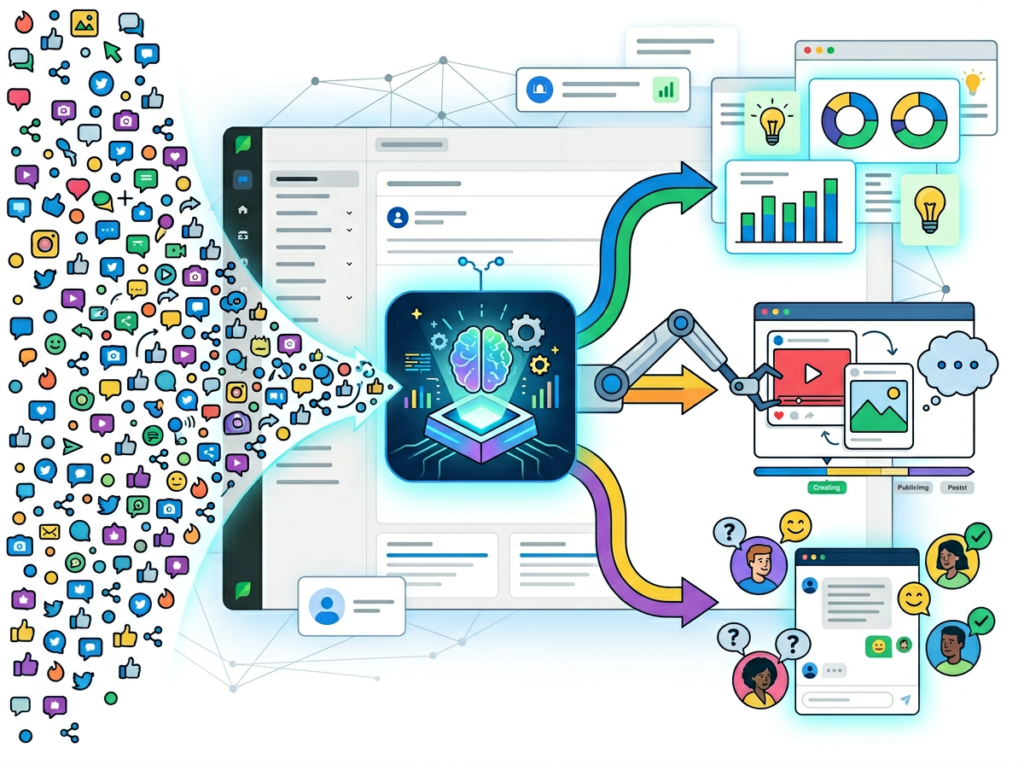
    Solo DX — short for Small-Scale Digital Transformation — describes the process by which US founders and small team leaders systematically replace founder-dependent, manual workflows with AI-powered, repeatable systems. It is not a technology trend. It is an operational survival strategy for American businesses scaling from 1 to 15 people without the benefit of a dedicated operations team.

    Solo DX sits in a distinct category from general AI efficiency work. Here is how the three major categories compare:

    CategoryWho It’s ForPrimary GoalOutcome
    AI EfficiencySolo operators, freelancersPersonal productivityDo more in less time
    Solo DXFounders leading small teamsOperational systemizationBuild repeatable workflows
    AI Revenue BoostGrowth-stage teamsRevenue generationDirectly increase sales

    Corporate SOP methodologies — the kind taught in business school and deployed at Fortune 500 companies — fail at the small business level for a simple reason: they require dedicated process owners, change management budgets, and months of rollout time. A 4-person design studio in Austin doesn’t have a Chief Operating Officer. They have a founder who is also the lead designer, the sales team, and the client liaison. Standard documentation playbooks were built for organizations that look nothing like theirs.

    Solo DX works differently. It focuses on capturing the three to five highest-leverage workflows — the ones that break down most often when a new hire joins or a founder takes a vacation — and building AI-powered systems around them. For social media, those workflows are: content ideation and drafting, scheduling and publishing, audience engagement, and analytics reporting.

    Consider a 3-person brand consultancy in Austin, Texas. Before implementing Solo DX principles, their Instagram content lived entirely in the founder’s head. When she hired a part-time social media assistant, onboarding took three weeks because there was no documented voice guide, no content calendar template, and no analytics baseline. After deploying Sprout Social AI and restructuring around Solo DX workflows, that same onboarding took four days. The AI-generated content drafts matched the brand voice. The scheduling templates were already built. The Trellis agent could answer questions about top-performing post formats on demand.


    Explore Sprout Social AI’s features to see how the platform maps directly to Solo DX implementation at the small business level.


    Why AI is Key for Mini-Team Systemization

    Problem 1: Social media knowledge lives only in the founder’s head

    In most small businesses, the person who built the brand voice is also the person who cannot afford to be bottlenecked by content approvals. Yet that is exactly what happens when social media systems are undocumented. Every post goes through the founder for tone check. Every new caption requires a briefing on what the brand “sounds like.” The AI solution: a platform like Sprout Social AI that stores brand voice parameters, generates on-brand copy using AI Assist, and learns what resonates through engagement data — so the founder’s judgment is captured in the system, not just in their head.

    Problem 2: New hires slow down operations, not speed them up

    US labor turnover reached 47% annually across industries including marketing and communications roles. Every time a social media coordinator leaves, their institutional knowledge — the posting schedule logic, the hashtag strategy, the engagement response templates — walks out with them. Small teams pay an average of $4,800 in replacement and onboarding costs per marketing hire, not counting the three-to-six weeks of lost productivity during ramp-up. AI-powered scheduling tools and documented content workflows mean a new hire can be operational within days, not weeks.

    Problem 3: Content quality varies wildly across team members

    When social media is a shared responsibility — split between a founder, a part-time coordinator, and whoever has a free hour on Thursday — the result is inconsistent. Different tones, different hashtag approaches, different post frequencies. Audiences notice. Engagement drops. AI social media automation tools like Sprout Social solve this by giving every team member access to the same AI-generated templates, the same Optimal Send Times recommendations, and the same brand voice guardrails.


    See the full Sprout Social AI review and feature breakdown before you start, so you configure the platform for your team’s specific workflow from day one.


    How Sprout Social AI Enables Solo DX

    Feature 1: AI Assist for Content Creation, $2,000+ saved per content cycle

    Sprout’s AI Assist feature generates post copy for any connected social network using brand voice parameters and historical performance data. A small team that previously spent 6–8 hours per week drafting content can reduce that to 90 minutes of review and approval. At a conservative internal cost of $65 per hour, that is a savings of $292 per week, or approximately $15,000 annually. For teams that outsource content creation at $1,500–$2,000 per month to freelancers, AI Assist allows that work to be brought in-house with no quality degradation — saving $18,000–$24,000 per year.

    The tool generates captions, hashtags, and post variations across LinkedIn, Instagram, Facebook, X, and TikTok from a single prompt. Founders who previously reviewed every post before publishing can now set brand voice guardrails and approve in batches — cutting approval time by an estimated 60%.

    Feature 2: Trellis AI Agent for Analytics to $9,000+ saved annually

    Trellis is Sprout’s proprietary AI Agent, launched in late 2025 and expanded significantly in Q1 2026 with the Trellis Monitoring Agent for real-time reputation management. Where traditional analytics require a team member to log in, pull reports, cross-reference platforms, and compile a summary — a process that takes 6–10 hours per week — Trellis responds to plain-language questions instantly.

    A small business owner can ask: “What were our top three performing posts this month and why did they outperform?” Trellis queries billions of social data points and returns a structured, actionable answer in seconds. As noted in Sprout’s Trellis AI Agent best practices documentation, good prompts include clear goals, timeframe context, and requests for actionable next steps — not just raw data.

    For a 5-person team paying $75 per hour blended rate for marketing labor, eliminating 6 hours of weekly analytics work saves approximately $23,400 per year. Even at reduced utilization — say, 3 hours saved per week — that is $11,700 annually. Trellis also functions as an always-on monitoring agent, surfacing sentiment spikes and emerging complaints before they become crises.

    Feature 3: Smart Inbox and Engagement Automation to $6,000+ saved annually

    Sprout’s Smart Inbox consolidates all social messages — comments, DMs, mentions, reviews — into a single prioritized stream. Rule-based automation routes messages by keyword, follower count, language, topic, and urgency. For a small team managing four or five social platforms simultaneously, this eliminates the daily scavenger hunt across native apps and reduces response time dramatically. According to third-party analysis, platforms using Sprout’s inbox management tools have reduced average response times from 48 hours to under 10 minutes — a metric that directly impacts customer satisfaction scores.

    For a US small business where one team member handles engagement 10 hours per week at $60 per hour, reducing that time by half saves $15,600 annually. Even modest efficiency gains compound quickly at US labor rates.

    See how Sprout Social AI works across each of these features, including current pricing and platform integrations available to US small teams.


    Ready to systemize your US team’s social media operations in under a week? Try Sprout Social AI | Plans starting at $199/month | Trusted by 30,000+ brands worldwide


    Common Pitfalls & How to Avoid Them

    Pitfall 1: Using too many disconnected tools

    Many small teams arrive at Sprout Social already running Buffer, Canva’s scheduler, native platform schedulers, and a spreadsheet for analytics. Adding Sprout on top without consolidating creates more confusion, not less. The fix: audit every tool you are currently using for social media and identify which ones Sprout replaces entirely. For most teams, Sprout consolidates four to six separate tools into one — reducing context-switching and eliminating duplicate subscription costs.

    Pitfall 2: Delegating without documentation

    Assigning social media tasks to a team member or contractor without first documenting voice guidelines, approval processes, and content standards guarantees inconsistency. AI tools amplify whatever inputs they receive. If the brand voice is not configured correctly in AI Assist, every generated post will drift from the intended tone. The fix: spend two hours upfront building a brand voice document and entering it into Sprout’s configuration before any content generation begins.

    Pitfall 3: Over-relying on Slack and email for social media knowledge

    When content decisions, brand guidelines, and approval history live in Slack threads and email chains, they become effectively invisible to anyone who joins later. The fix: use Sprout as the system of record for social media activity. Every decision that affects your content strategy — including why you stopped posting on a given platform or changed your hashtag approach — should be documented in Sprout or an attached knowledge base that Trellis can reference.


    Learn more about Sprout Social AI including its workflow configuration options, approval chain setup, and Trellis integration capabilities for US small business teams.


    FAQs
    What’s the difference between AI Efficiency and Solo DX?

    AI Efficiency tools help individual contributors get more done faster — think writing assistants, meeting summarizers, and personal task managers. Solo DX is about building systems that work even when key people are absent. A Solo DX implementation of Sprout Social AI means your social media operation runs consistently whether the founder is present or not, because the brand voice, the scheduling logic, and the analytics review process are all embedded in the platform.

    Can small teams afford to use AI for social media management?

    Yes. Sprout Social AI starts at $199 per month for standard accounts. For context, the average US freelance social media manager charges $1,500–$3,000 per month for part-time support. For teams where social media work was previously consuming 10+ hours per founder week, AI automation often returns more value in the first month than the annual subscription cost. The ROI case is strongest for teams handling four or more social platforms simultaneously.

    Is Sprout Social AI hard to set up?

    No. Connecting social accounts, configuring AI Assist, and activating Trellis for analytics queries can be completed in a half-day of setup. Sprout offers onboarding support, training materials, and a support team available for US-based accounts. Most small teams report being functional — scheduling content, reviewing analytics, and managing their inbox — within 48 hours of activation.


    Conclusion

    In 2026, American small businesses don’t need enterprise budgets to build enterprise-level social media systems. What they need is a platform that embeds AI intelligence directly into the workflows their teams already use — content creation, scheduling, engagement, and analytics — so that social media stops being a founder-dependent bottleneck and becomes a repeatable operational function.

    That is the Solo DX value proposition applied to social media: not just doing social faster, but building a system that runs consistently, scales with your team, and captures institutional knowledge in tools rather than in people’s heads. Sprout Social AI delivers this through AI Assist for content generation, Trellis for conversational analytics, Smart Inbox for engagement automation, and Optimal Send Times for reach maximization — all in a single platform built for the 30,000+ brands that have already made social intelligence a core business function.

    Start with one process. Pick your highest-friction social media workflow — whether that’s weekly content drafting, Monday reporting, or new-hire onboarding on brand voice — and systemize it this week using Sprout Social AI. The compounding returns on that single investment will make the next system easier to build.


    See the full Sprout Social AI review and feature breakdown before you start, so you configure the platform for your team’s specific workflow from day one.


  • Transform your ideas into functional code with a single AI-powered prompt.

    What is JDoodleClaw?

    JDoodleClaw is an AI-powered platform designed to assist with learning and practicing programming. It functions primarily as an interactive coding environment where users can write, execute, and debug code in numerous programming languages directly within a web browser. The tool can generate code snippets, explain programming concepts, and provide real-time feedback on code output and errors.
    Users typically interact with the system by entering text-based queries or code into a provided interface. They can ask for explanations, request code examples for specific tasks, or submit their own code for execution and analysis. In response, the AI processes the input to produce educational explanations, functional code blocks, and runtime results. The team behind the official website develops this tool to serve as a practical resource for coding instruction and hands-on practice.

    Key Findings

    • Code Execution: Executes and debugs code snippets in over seventy programming languages instantly online.
    • Cloud Compiler: Provides a secure cloud environment for compiling code without any local installation.
    • Real Time Collaboration: Enables multiple developers to edit and run code together in synchronized sessions.
    • API Integration: Seamlessly integrates with existing development tools and platforms through robust API connections.
    • Error Diagnostics: Delivers precise error messages and suggestions to fix code issues quickly.
    • Multi Language Support: Supports a vast array of languages from Java and Python to Go.
    • Customizable Workspaces: Allows teams to configure their coding environment with preferred tools and layouts.
    • Instant Feedback: Gives immediate output and performance metrics for written code upon execution.
    • Project Sharing: Facilitates easy sharing of complete coding projects with stakeholders via shareable links.
    • Security Focused: Ensures all code and data are protected with enterprise-grade encryption and compliance.

    Who is it for?

    Content Creator

    • Blog topic ideation
    • SEO keyword integration
    • Competitor content analysis
    • Engaging headline creation
    • Content repurposing script

    Marketing Manager

    • Campaign performance report
    • Customer persona refinement
    • Ad copy A/B testing
    • Market trend summary
    • Influencer outreach email

    Startup Founder

    • Investor pitch deck
    • Product feature prioritization
    • Competitive landscape overview
    • Weekly team update email
    • Problem-solving brainstorm

    Pricing

    Free @ $0/mo

    • Basic hosting
    • Zero setup
    • Limited usage

    Starter @ $19/mo

    • Increased usage limits
    • Basic support
    • Standard features

    Pro @ $49/mo

    • High usage limits
    • Priority support
    • Advanced features
    • API access

    Enterprise @ Custom/one-time

    • Custom usage limits
    • Dedicated support
    • Full feature access
    • Custom SLA
    • On-premise option
  • Turn your script into a video in minutes with an AI presenter.

    What is AI Studios?

    AI Studios by DeepBrain AI is a video generation platform that creates synthetic video content featuring AI-generated human presenters. Its core capability is producing realistic talking-head videos from a text script. Users can select from a library of digital avatars or create a custom one, and the platform generates a video where the avatar delivers the provided script with synchronized lip movements and natural gestures.
    The system operates primarily through a text-to-video model. A user inputs a written script, chooses an AI avatar and a background, and the platform’s artificial intelligence synthesizes the corresponding video. The technology, developed by DeepBrain AI, is designed to automate the production of presenter-style videos without requiring traditional filming, actors, or complex video editing software.

    Key Findings

    • AI Video: Creates professional videos instantly using simple text prompts and AI avatars.
    • Realistic Avatars: Features lifelike digital humans that speak and express emotions naturally and convincingly.
    • Text Script: Converts your written documents and ideas into ready-to-use video scripts automatically.
    • Multiple Languages: Supports video creation in various languages to reach a global audience effectively.
    • Easy Customization: Offers intuitive tools to personalize videos with logos, fonts, and branded colors.
    • Template Library: Provides a vast collection of pre-designed templates for quick video project starts.
    • Voice Synthesis: Generates clear, natural-sounding voiceovers in many different accents and tones on demand.
    • Cloud Platform: Enables access and editing from any web browser without software installation required.
    • Team Collaboration: Allows multiple users to work together on video projects seamlessly in real-time.
    • Cost Efficiency: Saves significant production resources compared to traditional video filming and editing methods.

    Who is it for?

    Marketer

    • Campaign video production
    • Social media content creation
    • Ad script generation
    • Brand story video
    • Localization of marketing assets

    Educator

    • Online course development
    • Training module creation
    • Personalized feedback videos
    • Accessible learning materials
    • Flipped classroom content

    Real Estate Agent

    • Virtual property tours
    • Neighborhood guide videos
    • Personalized client updates
    • Listing promotion
    • Email marketing campaigns

    Pricing

    Free @ $0/mo

    • 3 AI videos per month
    • 3 minute max video duration
    • 1 custom avatar
    • 720p export
    • 1 priority video per month
    • 16 generative credits

    Personal @ $24/mo

    • Unlimited AI videos
    • 30 minute max video duration
    • 3 custom avatars
    • 1080p export
    • 50 priority videos per month
    • 720 generative credits per year

    Team @ $55/mo

    • Unlimited AI videos
    • 60 minute max video duration
    • 5 custom avatars
    • 4K export
    • 150 priority videos per month
    • 1800 generative credits per year

    Enterprise @ Custom/one-time

    • Unlimited AI videos
    • Unlimited video duration
    • Unlimited custom avatars
    • 4K export
    • Always priority processing
    • Enterprise-scale generative credits
  • Turn market data into your brand’s competitive advantage.

    What is Branding5?

    Branding5 – AI Marketing Intelligence is a market research platform that uses artificial intelligence to analyze brand and marketing performance. It processes large volumes of publicly available online data to provide insights into brand positioning, competitive landscapes, and market trends. The system is designed to produce comprehensive reports and visual analytics on brand health, audience perception, and competitor strategies.
    Users interact with the platform by specifying a brand, industry sector, or competitors for analysis. The AI then scans and structures data from diverse digital sources, such as news, social media, and reviews. It outputs quantified intelligence, including share of voice, sentiment analysis, and strategic positioning maps, as presented on the official website. The tool automates the collection and synthesis of market data to support strategic decision-making.

    Key Findings

    • Brand Intelligence: Analyzes market trends and consumer data to craft compelling brand positioning strategies effectively.
    • Competitor Insights: Monitors rival campaigns and performance metrics to identify strategic opportunities and market gaps clearly.
    • Content Optimization: Enhances marketing material effectiveness by using AI-driven suggestions for tone and engagement improvements.
    • Audience Targeting: Identifies and segments ideal customer profiles using advanced demographic and behavioral data analysis precisely.
    • Campaign Analytics: Tracks performance across channels to measure ROI and optimize future marketing investments efficiently.
    • Trend Prediction: Forecasts emerging market movements and consumer preferences to keep your branding ahead proactively.
    • Visual Identity: Evaluates and recommends design elements that strengthen brand recognition and emotional connection consistently.
    • Message Crafting: Generates impactful marketing copy tailored to different platforms and audience segments for maximum resonance.
    • Performance Benchmarking: Compares your brand metrics against industry standards to highlight strengths and areas for improvement.
    • Strategy Automation: Streamlines planning and execution of marketing initiatives with intelligent, data-backed workflow recommendations.

    Who is it for?

    Entrepreneur

    • Business plan drafting
    • Market research analysis
    • Investor pitch refinement
    • Operational workflow optimization
    • Brand identity development

    Marketing Manager

    • Campaign performance report
    • Customer persona creation
    • SEO content brief generation
    • Social media calendar planning
    • Competitor analysis summary

    Content Creator

    • Blog post ideation
    • Video script outlining
    • Email newsletter drafting
    • Social media captions
    • Content repurposing strategy

    Pricing

    Complete Brand & Marketing Package @ $147/one-time

    • 1 brand one-time
    • Refresh data and update report anytime
    • Additional brands at $67
    • White-label export PDF DOCX
    • Brand positioning tools
    • Marketing strategy tools

    Multi-Brand Agency Plan @ $247/mo

    • Up to 20 new brands per month
    • Refresh data and update report anytime
    • Discounted top-up reports at $67
    • White-labeled reports
    • Custom branding options
    • Priority support
  • Video messages that build trust and accelerate sales.

    What is Sendspark?

    Sendspark is a video messaging platform designed to help users create and share personalized video content for communication. Its core capability is enabling the recording, customization, and distribution of video messages. The tool allows users to produce videos that can incorporate elements like screen recordings, webcam footage, and personalized introductory frames.
    Users typically interact with Sendspark through a browser-based interface to record or upload video. The system provides tools to edit these recordings, often allowing users to trim clips, add their branding, and insert clickable elements. The final output is a shareable video message, frequently distributed via a generated link that can track viewer engagement. According to the official website, the platform is developed to facilitate more personal and effective digital communication through video.

    Key Findings

    • Video Messaging: Create personalized video messages to connect with customers more personally and directly.
    • Screen Recording: Capture your screen and voice simultaneously to demonstrate products or explain complex processes clearly.
    • Team Collaboration: Share video drafts with team members for quick feedback and seamless project collaboration internally.
    • Analytics Dashboard: Track viewer engagement and video performance with detailed metrics to measure impact and effectiveness.
    • CRM Integration: Sync video data directly with your CRM to enrich customer profiles and streamline follow-ups.
    • Custom Branding: Add your company logo and colors to videos for a professional and cohesive brand presentation.
    • Interactive Videos: Embed clickable links and calls-to-action within videos to drive conversions and guide viewer journeys.
    • Secure Sharing: Control video access with password protection and expiration dates to ensure confidential information stays safe.
    • Template Library: Choose from a variety of pre-designed video templates to quickly create polished and effective content.
    • Audience Tracking: See exactly who watched your videos and for how long to identify hot leads instantly.

    Who is it for?

    Sales Representative

    • Personalized sales outreach
    • Follow-up after a meeting
    • Explaining complex proposals
    • Sharing customer testimonials
    • Re-engaging cold leads

    HR Manager

    • Onboarding new employees
    • Announcing policy updates
    • Promoting internal events
    • Personalized recruitment outreach
    • Collecting feedback

    Real Estate Agent

    • Virtual property tours
    • Introducing themselves to sellers
    • Follow-up after a showing
    • Market updates for clients
    • Explaining contract details

    Pricing

    Solo @ $49/mo

    • 1 seat included
    • Store 5000 videos
    • 100 Dynamic Video Minutes
    • AI voice cloning
    • Dynamic backgrounds
    • Personalized thumbnails

    Growth @ $99/mo

    • 3 seats included
    • Store 20000 videos
    • 250 Dynamic Video Minutes
    • Multiple AI variables
    • Agentic workflows
    • Advanced integrations

    Team @ $299/mo

    • 10 seats included
    • Store 100000 videos
    • 1000 Dynamic Video Minutes
    • Guided workflow setups
    • Dedicated onboarding
    • Admin dashboard

    Business @ $699/mo

    • 25 seats included
    • Unlimited video storage
    • 3000 Dynamic Video Minutes
    • Live Slack support
    • Dedicated account manager
    • Video boot camp
  • Turn your ideas into ready-to-use content in seconds.

    What is Readdy?

    Readdy is an AI-powered tool designed to assist in the creation of user interface designs and functional front-end code. It enables users to generate complete, interactive UI components and layouts from descriptive text prompts. The system can produce visual designs alongside the corresponding HTML, CSS, and JavaScript code, translating conceptual ideas into tangible web elements.
    Users interact with Readdy by providing natural language descriptions of the desired interface, such as specifying components, styles, and layout structure. The AI then processes this input to generate both a visual mockup and the underlying production-ready code. According to the team behind the official website, this process aims to streamline the initial phases of web development by automating the transformation of ideas into coded prototypes.

    Key Findings

    • AI Assistant: Handles customer inquiries and provides instant support around the clock daily.
    • Content Creation: Generates marketing copy, blog posts, and product descriptions quickly and efficiently.
    • Meeting Summarization: Records, transcribes, and distills key decisions and action items from every meeting.
    • Data Analysis: Processes complex datasets to uncover actionable insights and visual trends clearly.
    • Workflow Optimization: Identifies bottlenecks and suggests improvements to enhance overall operational efficiency and speed.
    • Email Management: Prioritizes, drafts, and organizes your inbox to save considerable time each week.
    • Code Generation: Writes, debugs, and explains code snippets in multiple programming languages for developers.
    • Research Acceleration: Gathers and synthesizes information from diverse sources into concise, structured reports.
    • Presentation Builder: Creates compelling slides with visuals and talking points based on your outline.
    • Language Translation: Accurately translates documents and conversations in real time across numerous global languages.

    Who is it for?

    Marketer

    • Campaign idea generation
    • Social media content creation
    • SEO blog post writing
    • Ad copy variations
    • Market analysis summary

    HR Manager

    • Job description writing
    • Policy document drafting
    • Employee newsletter content
    • Training material creation
    • Response to employee inquiries

    Startup Founder

    • Investor pitch deck creation
    • Business plan refinement
    • Product feature description
    • Customer email campaign
    • Competitive analysis

    Pricing

    Free @ $0/mo

    • 250 Credits per Month
    • 2 Projects
    • 200 MB Storage per Project
    • Credit Guard 10 Times per Month
    • 1 Editor & 5 Viewers per Project

    Starter @ $15/mo

    • 30000 Credits per Year
    • 1 Free Custom Domain
    • Publish with Custom Domain
    • No Readdy Branding on Websites
    • 10 Projects
    • 1 GB Storage per Project

    Pro @ $24/mo

    • 72000 Credits per Year
    • 1 Free Custom Domain
    • Publish with Custom Domain
    • No Readdy Branding on Websites
    • Unlimited Projects
    • 5 GB Storage per Project

    Agency @ Contact Us/one-time

    • Unlimited Credits
    • Project Collaboration
    • Code Editing and Downloading
    • AI SEO Optimization
    • Site Deployments and Hosting
    • 24×7 Support
  • AI coding assistant that instantly debugs, optimizes, and explains your code.

    What is Kodezi?

    Kodezi is an AI-powered coding assistant designed to help developers write, debug, and improve their code. It functions as an automated programmer’s companion that can interpret natural language instructions to generate code snippets, explain existing code, and identify errors. The tool can also translate code between different programming languages and optimize code for performance and readability.
    Users typically interact with Kodezi by providing input in the form of code or a text prompt describing a programming task. The AI then processes this input to produce outputs such as corrected code, detailed explanations, or new functional code segments. According to the team behind the official website, the system leverages machine learning models trained on public code repositories to perform these tasks.

    Key Findings

    • AI Assistant: Acts as your personal coding expert to debug and optimize code in real time instantly.
    • Code Debugger: Automatically finds and fixes errors in your code across multiple programming languages efficiently.
    • Code Explainer: Translates complex code into simple plain English explanations for better understanding and learning.
    • Grammar Checker: Reviews and corrects grammatical mistakes within comments and documentation for clear communication.
    • Code Translator: Converts code seamlessly between different programming languages to aid migration and learning.
    • Performance Optimizer: Analyzes and suggests improvements to make your code run faster and use less resources.
    • Documentation Generator: Creates detailed and structured documentation from your source code to save development time.
    • Team Collaboration: Enables multiple developers to work together on code review and fixes simultaneously.
    • Learning Tool: Helps programmers understand new codebases and learn best practices through interactive explanations.
    • Security Scanner: Identifies potential vulnerabilities and security flaws within your code to prevent future risks.

    Who is it for?

    Programmer

    • Debugging complex code
    • Code documentation generation
    • Writing unit tests
    • Code refactoring suggestions
    • Translating code between languages

    Content Creator

    • Generating blog post ideas
    • Repurposing long-form content
    • SEO keyword optimization
    • Writing compelling email copy
    • Proofreading and tone adjustment

    Project Manager

    • Creating project timelines
    • Summarizing meeting notes
    • Drafting status reports
    • Identifying project risks
    • Writing project proposals

    Pricing

    Kodezi Code @ $0/mo

    • Kodezi Create
    • Web-based IDE Access
    • 25 credits per day
    • Advanced Code Models

    Kodezi Pro @ $9.99/mo

    • Kodezi Create
    • Web IDE Pro
    • Advanced Code Models
    • 100 credits per day
    • Kodezi OS

    Kodezi CLI + OS @ $59.99/mo

    • Dev Stack Integration
    • Full CLI Toolset
    • Kodezi OS
    • Smart PRs
    • Auto-Healing
    • Kodezi OS Intelligence
  • Connect any app, automate any workflow with a simple visual canvas.

    What is Latenode?

    Latenode is a workflow automation platform that enables users to connect various applications and services to create automated sequences, known as workflows or integrations. Its core function is to automate tasks and data transfer between different software tools without manual intervention. The platform can execute operations like moving information, triggering actions based on specific events, and processing data according to predefined logic.
    The system operates primarily through a visual interface where users design workflows by arranging modular components, often called nodes or blocks. Each node represents a step or an action in a connected application, such as a database, CRM, or messaging service. Users configure these nodes to define the flow of data and the conditions for execution. According to the team behind the official website, this approach allows for the creation of custom automations that streamline repetitive processes across a user’s technology stack.

    Key Findings

    • Visual Automation: Builds complex workflows visually without writing a single line of code yourself.
    • Hybrid Execution: Runs automation logic seamlessly across both cloud servers and local machines securely.
    • Multi Language: Supports JavaScript, Python, and Bash for writing custom logic blocks with full flexibility.
    • Prebuilt Templates: Jumpstart projects with ready-made automation templates for common business processes and integrations.
    • Team Collaboration: Enables shared workspaces and version control for teams to build automations together efficiently.
    • Cost Optimization: Dynamically scales resources to reduce cloud computing expenses while maintaining high performance.
    • Reliable Monitoring: Provides real-time logs and alerts to track workflow execution and quickly resolve issues.
    • Data Integration: Connects effortlessly to databases, APIs, and apps like Google Sheets and Slack daily.
    • Instant Deployment: Publishes and triggers automated workflows instantly via webhooks, schedules, or manual clicks.
    • Advanced Security: Ensures data protection with enterprise-grade security, private networks, and strict access controls.

    Who is it for?

    Project Manager

    • Project status reporting
    • Automated milestone tracking
    • Resource allocation overview
    • Client communication drafts
    • Meeting agenda creation

    Office Administrator

    • Expense report processing
    • Meeting room scheduling
    • Vendor communication
    • Travel itinerary creation
    • Document formatting

    Marketing Manager

    • Campaign performance report
    • Social media content calendar
    • Competitor analysis summary
    • Lead nurturing email drafts
    • Event promotion plan

    Pricing

    Free @ $0/mo

    • 300 workflow executions
    • 5 active scenarios
    • Unlimited nodes per scenario
    • 10 connected accounts
    • 1 parallel execution
    • 10 AI Copilot requests

    Mini @ $5/mo

    • 1000 workflow executions
    • Unlimited active scenarios
    • Unlimited nodes per scenario
    • 10 connected accounts
    • 5 parallel executions
    • 100 AI Copilot requests

    Start @ $19/mo

    • 25000 workflow executions
    • Unlimited active scenarios
    • Unlimited nodes per scenario
    • 10 connected accounts
    • 5 parallel executions
    • 100 AI Copilot requests

    Team @ $59/mo

    • 250000 workflow executions
    • Unlimited active scenarios
    • 5 team members
    • Unlimited nodes per scenario
    • 100 connected accounts
    • 20 parallel executions
    • 500 AI Copilot requests
  • Enterprise AI that delivers measurable ROI, not just promises.

    What is Exemplary AI?

    Exemplary AI is a video summarization tool that uses artificial intelligence to analyze and condense video content. Its primary function is to process lengthy videos and automatically generate concise summaries. The system can produce written transcripts, extract key points, and create shorter highlight reels from the original footage. This allows users to quickly grasp the essential information within a video without watching it in its entirety.
    The tool operates by having users upload a video file or provide a video link. Users can then direct the AI to focus on specific aspects, such as identifying main topics, action items, or questions discussed. The AI processes the audio and visual information to output structured summaries and transcripts. According to the official website, the team behind Exemplary AI has developed this system to handle various types of video content for analysis and condensation.

    Key Findings

    • AI Assistant: Provides intelligent support and answers to enhance team productivity and collaboration daily.
    • Business Insights: Delivers actionable data analysis and forecasts to drive smarter strategic decisions and planning.
    • Workflow Automation: Streamlines complex processes and tasks to boost operational efficiency and reduce manual errors.
    • Custom Integration: Seamlessly connects with existing tools and platforms to unify systems and enhance functionality.
    • Real-Time Analytics: Monitors key performance indicators continuously to provide immediate insights and prompt adjustments.
    • Predictive Modeling: Anticipates future trends and outcomes using advanced algorithms to guide proactive strategies.
    • Secure Operations: Protects sensitive data with enterprise-grade encryption and compliance protocols to ensure safety.
    • User Training: Offers personalized onboarding and resources to maximize adoption and proficiency across teams.
    • Scalable Solutions: Adapts to growing business needs and demands effortlessly to support expansion and evolution.
    • Continuous Updates: Regularly enhances features and capabilities based on user feedback and technological advancements.

    Who is it for?

    Marketer

    • Campaign idea generation
    • Ad copy variations
    • SEO keyword strategy
    • Competitor content analysis
    • Monthly performance report

    Project Manager

    • Meeting minute summarization
    • Project timeline draft
    • Risk register population
    • Stakeholder update email
    • Post-mortem report outline

    Content Creator

    • Blog post outline creation
    • Social media captions
    • Newsletter content ideation
    • Video script drafting
    • Content repurposing

    Pricing

    Free @ $0/mo

    • 60 upload minutes per month
    • Single user access
    • 14 days data retention
    • 1 GB upload file size
    • 1 hour upload length
    • 20 AI content generations

    Starter @ $12/mo

    • 2400 upload minutes per year
    • 1 workspace user
    • 100GB storage
    • 2 GB upload file size
    • 4 hour upload length
    • 200 AI content generations

    Pro @ $19/mo

    • 7200 upload minutes per year
    • 3 workspace users
    • 500GB storage
    • 4 GB upload file size
    • 8 hour upload length
    • Unlimited AI content generations

    Team @ Custom/one-time

    • Custom upload minutes
    • Multiple users
    • Custom storage
    • Tailored solutions
    • Dedicated account representative
    • Org controls and SSO
  • Turn any document into an instant, interactive Q&A session.

    What is Myreader AI?

    Myreader AI is a specialized tool designed to summarize and analyze academic papers and other lengthy documents. Its core function is to process complex texts, such as research articles and reports, to extract and condense key information. The tool produces concise summaries, explains central concepts, and can answer specific questions about the document’s content to facilitate quicker comprehension.
    Users interact with the system primarily by uploading documents or providing URLs to online articles. The AI then processes this text input to generate structured overviews and insights. According to the team behind the official website, the tool aims to reduce reading time by providing clear, distilled outputs from dense source material.

    Key Findings

    • Document Summarization: Instantly condenses lengthy reports into concise actionable summaries for busy professionals.
    • Research Acceleration: Aggregates and analyzes data from multiple sources to deliver comprehensive insights rapidly.
    • Knowledge Extraction: Identifies key themes and arguments from complex texts saving hours of manual review.
    • Content Organization: Structures scattered information into clear logical frameworks enhancing understanding and recall.
    • Trend Identification: Spots emerging patterns and critical data points across documents to inform strategy.
    • Personalized Digests: Creates custom briefs tailored to your specific interests and project requirements daily.
    • Citation Generation: Automatically formats references and bibliographies ensuring accuracy and saving valuable time.
    • Cross-Referencing Analysis: Connects related concepts across different documents to reveal deeper contextual relationships.
    • Multilingual Processing: Reads and summarizes content in numerous languages breaking down global information barriers.
    • Collaborative Insights: Shares annotated summaries and key findings with team members to align understanding quickly.

    Who is it for?

    Content Creator

    • Blog post drafting
    • Competitor article analysis
    • Trend report summarization
    • SEO keyword integration
    • Content calendar planning

    Project Manager

    • Meeting minute extraction
    • Stakeholder report creation
    • RFP document analysis
    • Risk log updating
    • Vendor proposal comparison

    Legal Assistant

    • Deposition transcript review
    • Contract clause summarization
    • Legal research compilation
    • Client intake notes organization
    • Regulatory change briefing

    Pricing

    FREE @ $0/mo

    • 5 queries per day
    • 250,000 characters
    • 10 MB file size limit
    • Listen to audiobooks
    • Add article links
    • Add Youtube videos

    LITE @ $6/mo

    • 100 queries per day
    • 25 million characters
    • 250 MB file size limit
    • Listen to audiobooks (10 hrs)
    • Add article links
    • Add Youtube videos

    PRO @ $12/mo

    • 1000 queries per day
    • 75 million characters
    • No size limit
    • Listen to audiobooks (30 hrs)
    • Add article links
    • Add Youtube videos