
The best ai coding agent doesn’t write code for you — it multiplies what you ship per hour, and Cline is redefining that ceiling for developers everywhere.
In 2026, American developers, indie hackers, and technical founders face a paradox that only grows sharper each quarter.
The tools available to build software have never been more powerful. Cloud infrastructure is commoditized. Open-source libraries cover nearly every use case. And yet — the backlog never shrinks. The sprint never ends. The solo founder still burns midnight oil on boilerplate, debugging, and documentation that genuinely shouldn’t require human brainpower.
For US-based developers billing at market rate — typically $75 to $200 per hour for freelance contract work — every hour spent writing repetitive CRUD endpoints, debugging environment issues, or wading through dependency conflicts is an hour not spent on architecture decisions and product strategy that actually move the needle.
Enter Cline: an open-source AI coding agent that lives inside VS Code and operates at the level of files, terminals, and browsers — not just line-by-line suggestions. Unlike standard autocomplete tools, Cline plans entire development tasks, chains actions across multiple files, runs shell commands, reads output, and iterates — all within a human-approved loop.
This article is a practical blueprint for how developers at every level can use Cline to automate coding tasks, compress development cycles, and reclaim focused time that compounds into shipped products. You’ll walk away with four specific workflows to implement this week, each realistically saving two to six hours of development overhead. For a US developer billing at $100 per hour, that’s $800 to $2,400 in recovered capacity every week.
Install Cline free in VS Code and run your first agentic coding task today. Get Started Free | Open source — no subscription required
Key Concepts of AI Coding Efficiency

Concept 1: Agentic Task Execution vs. Line Completion
Most developers’ first experience with AI coding is autocomplete — GitHub Copilot suggesting the rest of a function, or ChatGPT generating a block of code to paste in. This is useful, but it’s fundamentally reactive. You’re still the orchestrator of every small action.
Agentic task execution is different. An AI coding agent receives a goal — “refactor the authentication module to use JWT instead of sessions, update all dependent routes, and write tests” — and then plans and executes a sequence of steps to accomplish it. It reads files, edits code, runs commands, checks output, and corrects errors in a loop until the task is done or it flags something that needs your judgment.
For a developer like Marcus, a solo full-stack consultant in Denver, this shift changes the economics of his week. He used to spend roughly three hours per client project on boilerplate setup: scaffolding file structures, wiring up environment variables, configuring linting and testing infrastructure. With an agentic approach, that overhead compresses to a single reviewed session — roughly 25 minutes of human oversight on a task Cline executes end-to-end. Across four active clients per month, that’s nearly ten hours reclaimed just on project initialization.
For advanced agentic workflow strategies and multi-step task configurations, explore Cline in detail.
Concept 2: Context Window Depth and Codebase Awareness
One of the most underappreciated costs in software development is the mental overhead of holding a codebase in your head. Research on developer cognition shows that context-switching between files, remembering module dependencies, and reconstructing mental models after interruptions accounts for a significant portion of daily overhead. One widely cited figure suggests it takes an average of 23 minutes to return to deep focus after an interruption.
AI coding tools that can read and reason about your entire codebase — not just the open file — fundamentally change this equation. When the agent already knows how your database schema connects to your API layer connects to your frontend components, you stop spending cognitive energy on mapping. You describe the outcome. The agent navigates the map.
Sarah, a freelance React developer in Austin billing $120 per hour, used to spend 90 minutes per week on re-orientation time — re-reading her own code after stepping away to remember how things connected. With a codebase-aware agent, that overhead essentially disappears. That’s roughly 72 hours per year, worth approximately $8,600 at her billing rate.
Concept 3: Human-in-the-Loop Control as a Feature, Not a Bug
A common concern among developers evaluating AI agents is loss of control — the fear that the agent will silently make architectural decisions or introduce vulnerabilities without flagging them. The best implementations address this explicitly.
The human-in-the-loop model treats developer approval not as friction but as architecture. The agent plans, presents its approach, and waits for confirmation before executing consequential actions like writing to files, running shell commands, or making API calls. This preserves control while eliminating low-leverage execution work. As noted in this breakdown of developer productivity patterns, the most effective AI-augmented workflows are those where developers maintain explicit decision authority over architectural choices while delegating execution of well-defined tasks.
How Cline Helps Developer Efficiency
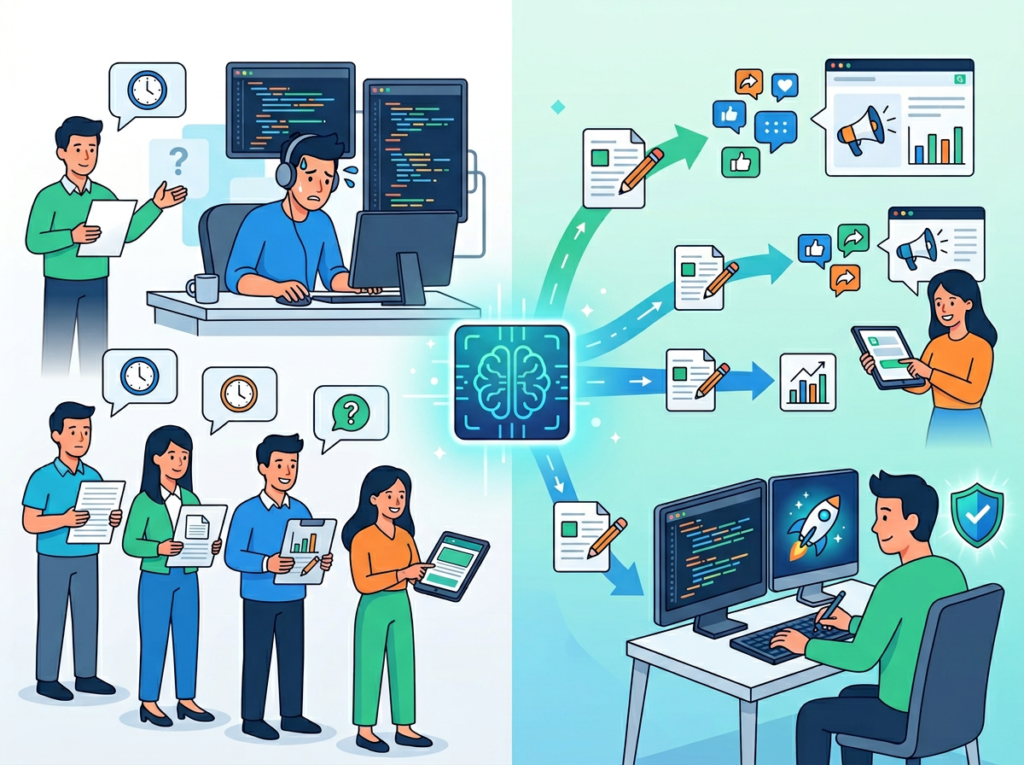
Feature 1: Plan/Act Mode — Architectural Thinking Before Execution
Cline separates planning from execution as a first-class feature. In Plan mode, you describe a goal and Cline maps out the approach: which files it will touch, what it intends to change, what edge cases it anticipates, and what assumptions it’s making. You review the plan, revise if needed, and approve. Only then does Cline switch into Act mode and execute.
This separation is critical for maintaining code quality at speed. Developers who adopt this workflow consistently report fewer surprise diffs, less rollback time, and more predictable outcomes.
For a solo SaaS developer shipping two to three features per sprint, the planning step typically adds five to ten minutes per task while eliminating 45 minutes to two hours of downstream debugging and rework. At $150 per hour, avoiding two hours of rework per week returns over $15,000 per year.
Feature 2: Multi-File Editing and Codebase Navigation
Cline reads your entire project directory, not just the open file. It traces function calls across modules, understands import dependencies, identifies where a change ripples to other files, and executes coordinated edits in a single task.
For refactoring work — renaming a data model, updating an API contract, migrating between libraries — this eliminates the tedious search-and-replace archaeology developers normally do manually. A database schema change touching 12 files in a medium-sized project might take a careful developer 90 minutes. Cline handles it in eight to twelve minutes of machine execution with a review pass at the end.
Annual time saved for a developer running two to three significant refactors per month: 30 to 40 hours per year, worth $4,500 to $8,000 at standard freelance rates.
To see these capabilities in action with real workflow examples, see our full Cline review.
Feature 3: Terminal Execution and Error Iteration
Cline can run shell commands directly within VS Code — installing dependencies, running tests, executing build scripts, spinning up dev servers — and it reads the output. When a command fails, Cline analyzes the error, proposes a fix, and asks permission to try again. This turns debugging loops from manual back-and-forth into a supervised iteration cycle.
For environment setup tasks — configuring a new project’s toolchain, debugging Docker containers, resolving dependency conflicts — this is particularly valuable. Environment configuration is high-frustration, low-intellectual-value work. Delegating the iteration to Cline while maintaining approval over each step compresses a 90-minute debugging session to roughly 20 minutes of oversight.
Annual time saved for a developer handling environment setup across client projects and personal builds: 25 to 40 hours per year.
Feature 4: MCP Integration and Extensibility
Cline’s architecture supports Model Context Protocol (MCP) servers, which allow developers to extend its capabilities with external tools: real-time web search, database connectors, project management integrations, and more. As outlined in Cline’s official guide to beginner, intermediate, and advanced setups, the MCP marketplace is where advanced users unlock capabilities that address gaps in the underlying language model — like accessing documentation for newly released libraries or integrating with Jira, Linear, or Notion for task tracking within the development workflow.
For a technical founder managing both the product roadmap and the engineering work, MCP-enabled Cline becomes more than a coding assistant — it becomes a connected development environment that bridges code and project management in a single interface.
Combined ROI across all four capabilities for a US developer billing $100 to $150 per hour: conservatively $20,000 to $35,000 in recovered productive time annually, against a tool cost that is free and open-source (with API costs varying by usage and model selection).
Ready to ship faster without burning out? Install Cline free in VS Code and run your first agentic coding task today. Get Started Free | Open source — no subscription required
Best Practices for Implementing Cline in Your Workflow

Successfully implementing an AI coding agent requires more than installing a VS Code extension. The developers who get the most leverage from Cline share a common set of habits.
Start with one well-defined task category. The most common mistake is trying to use AI coding tools everywhere at once, which leads to inconsistent results and eventual abandonment. Instead, identify the single most predictable and time-consuming task category in your workflow — test writing, API scaffolding, documentation generation — and go deep there first. Depth in one area beats breadth across five.
Write structured task inputs, not casual prompts. The quality of Cline’s output is directly proportional to the specificity of your task description. As covered in this practical guide to effective Cline usage, the structure of how you frame a task often matters more than the complexity of the task itself. Specify the input/output contract, name the relevant files, describe expected behavior, and note constraints. Invest two to three minutes writing a structured brief — the planning step will be faster and the review will take less time.
Review plans before approving execution on consequential tasks. Cline’s Plan/Act separation exists for a reason. On tasks that touch core logic, security-sensitive code, or database schemas, read the execution plan carefully before approving. This oversight step is where your architectural judgment adds the most value.
Track what you’re delegating. Keep a simple log of task categories you’re routing to Cline. After four to six weeks, review it. You’ll find which categories produced the best results and where to focus further workflow refinement.
Limitations and Considerations

AI coding agents like Cline work exceptionally well for repetitive, well-defined, and execution-heavy development tasks. They have genuine limitations that developers should understand clearly before redesigning their workflow around them.
Architectural decisions require human judgment. Cline can scaffold the implementation of an architectural pattern you’ve chosen. It cannot reliably choose the right architectural pattern for your specific system, team, and constraints. Decisions about database design, service boundaries, API contracts, and technology selection involve context — business requirements, team capability, long-term maintenance cost, scaling assumptions — that no AI agent can fully internalize from a task brief. These decisions belong to you.
Security-sensitive code needs careful review. Authentication logic, authorization rules, cryptographic implementations, and input validation are areas where AI-generated code requires rigorous human review regardless of how confident the agent appears. Cline is a capable implementation tool, but security correctness demands adversarial thinking — imagining how the code could be abused — that current AI agents don’t reliably apply. Treat AI-generated security code as a first draft written by a skilled but non-specialist engineer: useful as a starting point, not safe to ship without thorough review.
Hallucination and library currency are real risks. AI models have training cutoffs and can generate plausible but incorrect implementations for APIs that have changed since training. When working with recently released libraries, new framework versions, or less common dependencies, verify Cline’s implementations against current official documentation. The MCP-based web search integration helps with this but doesn’t fully eliminate the risk.
Over-reliance can erode core skills. This is the limitation that gets the least attention in AI productivity discourse and deserves the most. Developers who delegate large categories of work to AI agents over long periods without staying engaged with the underlying concepts risk gradual skill atrophy in those areas. Maintain deliberate engagement with the work Cline is doing for you — don’t just approve and ship. Read the code, understand the patterns, and stay current on the techniques being applied in your domain.
Frequently Asked Questions

How do developers use Cline to automate coding tasks?
The most effective workflow involves three steps: write a structured task brief describing the goal, inputs, constraints, and expected outcome; review Cline’s execution plan in Plan mode; and approve the execution in Act mode while monitoring output. Developers typically start by automating one predictable task category — test generation, boilerplate scaffolding, documentation — and expand from there as they build confidence in the tool’s output quality for their specific codebase.
What are the best AI developer productivity tools in 2026?
The strongest category of AI developer productivity tools in 2026 combines codebase-aware agents (like Cline) with language model interfaces (like Claude and GPT-4) and code review assistants. The key differentiator to evaluate is whether a tool operates at the task level with human-in-the-loop control, or only at the line level with reactive suggestions. For developers focused on shipping velocity, task-level agents with explicit approval workflows consistently outperform reactive autocomplete tools.
Do I need to be an advanced developer to use Cline effectively?
No. Cline is designed with a progressive setup model — beginners can get meaningful value by selecting a strong base model and running tasks out of the box, without any custom configuration. Intermediate and advanced workflows add custom rules, memory banks, and MCP integrations as needs grow. The primary requirement is being able to describe development tasks clearly and evaluate code output — skills any working developer already has.
Conclusion

The developers who will compound their output most significantly over the next few years aren’t necessarily the ones who write the most code. They’re the ones who correctly identify which parts of their workflow require genuine engineering judgment — and which parts are execution overhead that can be safely delegated to a well-supervised agent.
Cline represents a mature, practical answer to that question. It’s not an AI pair programmer that sometimes gets in the way. It’s an AI coding agent that operates at the task level — planning full implementations, executing across multiple files, running terminal commands, iterating on errors — and staying inside an approval loop that keeps architectural control exactly where it belongs: with you.
For US developers, indie hackers, and technical founders where time is the binding constraint on what gets shipped, the economics are straightforward. If Cline recovers 10 hours per week of development overhead — a conservative estimate for developers who adopt it systematically across scaffolding, testing, documentation, and refactoring — the annual return runs well above 100x the cost of the tool (which is zero, since Cline is open source).
The question for developers in 2026 isn’t whether AI coding agents are worth using. It’s whether you can afford to keep doing execution work by hand while others ship twice as fast.
Start with one task category this week. Pick the most repetitive, most time-consuming unit of work in your current sprint. Write Cline a structured brief. Review the plan. Approve the execution. That’s the workflow.
Install Cline free in VS Code and run your first agentic coding task today. Get Started Free | Open source — no subscription required
Leave a Reply